AI Ad Generator for Business: How Brands Can Create More Campaign Variations Faster
Businesses can use an AI ad generator like AIReel to turn product images and text prompts into promotional posters and video ads, creating multiple campaign variations with different visual styles, formats, and messaging in less time.

AI tools give businesses a faster way to create product ads, promotional images, and video content. Instead of designing every creative from scratch, marketers can use product photos and text prompts to generate different versions of an advertisement.
This makes it easier to try different visual styles, promote products across multiple platforms, and keep campaigns fresh. But how can businesses make the most of an AI ad generator and create more campaign variations in less time?
How AI Ad Generators Help Businesses Create Ads Faster
With an AI ad generator, businesses can create different types of advertising content using simple text prompts and product images. Rather than designing each ad individually, marketers can try different layouts, backgrounds, and video styles to find the right look for their campaigns.
- Explore Different Ad Styles: Create multiple versions of the same product ad by changing backgrounds, colors, layouts, and visual styles. This gives brands more creative options without redesigning everything from scratch.
- Turn Product Photos into Promotional Content: Use existing product images to create advertising posters and lifestyle visuals. Businesses can showcase products in different settings without arranging multiple photoshoots.
- Transform Static Images into Video Ads: Turn product photos into short promotional videos with movement and visual effects. This is particularly useful for brands that need video content for social media advertising.
- Create Ads for Different Platforms: Adjust aspect ratios and resolutions to fit different placements, including TikTok videos, Instagram Reels, Facebook ads, and YouTube content.
- Test More Creative Variations: Produce different versions of an ad with alternative visuals and messaging. Marketers can compare their performance to identify which creatives better resonate with their target audiences.
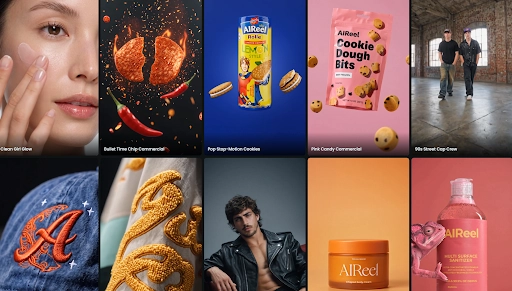
How to Create Multiple Ad Variations in Less Time with AIReel
For businesses looking to create product ads without spending hours on design and editing, AIReel offers a convenient solution. Its Marketing Studio lets users turn product images into advertising posters and videos with a few simple steps.
Step 1: Upload Product Images
Open AIReel Marketing Studio and select AI Product Video or AI Product Poster. Upload up to 10 relevant product images.
Step 2: Set Video and Audio Options
If you choose AI Product Video, select the video duration. You can also upload up to three audio files, with a combined maximum duration of 15 seconds.
Step 3: Enter Your Prompt
Describe the advertising style you want, including the background, visual effects, product presentation, and overall atmosphere.
Example prompt: “A high-octane, premium commercial for a food product, featuring “bullet-time” effects, high-speed camera motion, and a shallow depth of field. The background is deep…”
Step 4: Choose Output Settings
Select the resolution and aspect ratio based on where you plan to use the ad, such as TikTok, Instagram, or YouTube.
Step 5: Generate and Download
Click Generation Now to create your ad. Download the result or adjust your prompt and settings to generate another variation.
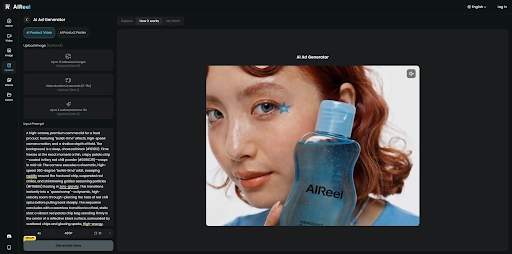
With these steps, businesses can use AIReel as a practical video ad maker to create promotional content and experiment with different advertising styles more efficiently.
5 Practical Ways Businesses Can Use AI Ad Generators for Marketing
AI ad generators can be used for more than creating standard product advertisements. Brands can apply them to different campaign formats, from promotional posters to short-form videos, depending on their marketing goals.
1. Product Launch Campaigns
Create teaser posters, product introduction videos, and promotional visuals to build interest before a new product launch. Different creative styles can help present the same product from multiple angles.
2. Seasonal Sales and Special Offers
Prepare advertising creatives for Black Friday, Christmas, Valentine’s Day, and other seasonal promotions. Businesses can experiment with different backgrounds, promotional messages, and visual themes for each campaign.
3. Social Media Video Campaigns
Turn product images into short video ads for TikTok, Instagram Reels, and YouTube Shorts. Adding different visual effects and opening scenes can help brands create more engaging content.
4. Product Feature Demonstrations
Use AI-generated visuals and videos to highlight specific product features, materials, or use cases. Instead of relying on a single product photo, brands can present different selling points through separate creatives.
5. Retargeting Ad Campaigns
Create alternative versions of existing advertisements for audiences who have previously visited a website or viewed a product. Different visuals and promotional messages can give brands more options when refreshing retargeting creatives.
How to Make AI-Generated Ads More Effective
Generating more advertising creatives does not automatically guarantee better campaign performance. Businesses should combine AI-generated content with a clear marketing strategy and regular creative testing.
Here are some practical tips to improve your AI advertising workflow:
- Write Specific Prompts: Clearly describe your product, target audience, visual style, and advertising objective to get more relevant results.
- Maintain Brand Consistency: Keep logos, colors, product details, and messaging consistent across different advertising variations.
- Experiment with Different Hooks: Try different opening scenes, promotional messages, and visual concepts to discover what attracts your target audience.
- Optimize for Each Platform: Select appropriate aspect ratios, resolutions, and video durations based on where your advertisements will appear.
- Review Every Generated Creative: Check product details, text, logos, and visual quality before publishing. AI-generated content may contain inaccuracies that require manual correction.
- Test and Analyze Performance: Compare different creative variations using relevant campaign metrics, such as click-through rates and conversions. Use the results to guide future creative decisions.
Final Thoughts
Creating more ad variations doesn’t have to mean spending more time on design and editing. With tools like AIReel, businesses can turn product images into promotional posters and videos, then experiment with different prompts and visual styles to create new versions. This gives brands a practical way to refresh their advertising creatives and prepare content for different campaigns.