As organizations continue shifting critical workloads to the cloud, protecting sensitive data has become more complex than ever. From accidental deletions and ransomware attacks to compliance requirements and system failures, different risks call for different protection strategies.
Understanding the available cloud data protection methods and knowing when each one is most effective can help businesses build a resilient security framework that minimizes downtime, safeguards valuable information, and supports long-term operational continuity.
To keep files safe, you must learn about the data security measures available today. Not every tool works for every need. Picking the right setup makes a big difference for your safety.
Exploring the Types of Cloud Data Protection can help businesses understand which methods are best suited to different security risks and operational needs.
Here is a simple look at the main cloud data protection methods and when to use them.
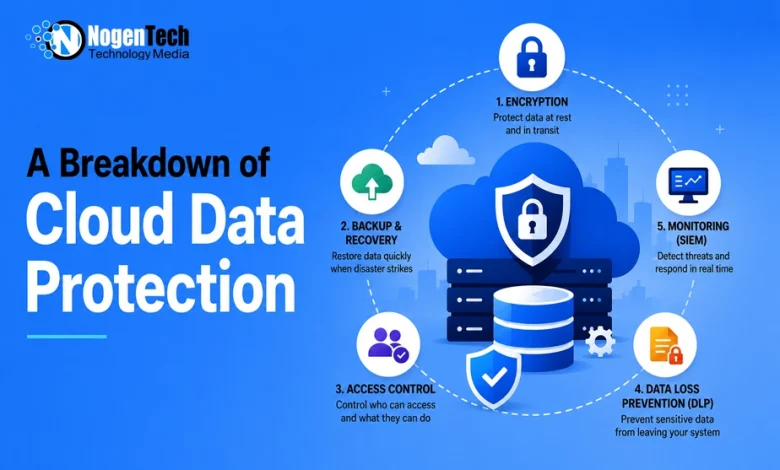
1. Cloud Data Encryption
Encryption acts like a secret code. Only people with a special key can read it. A hacker might steal your files. Without the key, they see only mixed-up text.
How It Works
● Data at Rest: Secures files while they sit on cloud servers or drives.
● Data in Transit: Secures data while it travels over the web.
When to Use It
Use encryption for sensitive files. This includes customer payments, worker records and private business plans. Turn it on for saved files and moving files alike.
2. Cloud Backup and Recovery
A cloud backup creates extra copies of your data. It stores them in a safe place. You might lose your main files. Malware might lock your system. A team member might erase a folder. With a backup, you can restore your data quickly.
Common Backup Types
● Full Backups: Copies all selected data every single time.
● Incremental Backups: Copies only files that changed since the last run. This saves time and space.
When to Use It
Every team needs a solid backup plan. Ransomware remains a leading threat to businesses – the FBI’s Internet Crime Complaint Center received 3,611 ransomware reports in 2025 alone. Backups serve as your primary safety net against these attacks, plus power loss, system crashes and simple mistakes.
3. Cloud Access Control and Identity Management
Access control sets rules for your team. It decides who can log in. It also controls what files each person can see or edit. Do not give everyone access to every folder. Instead, match file access to each job role.
Key Tools
● Multi-Factor Authentication (MFA): Asks for two or more steps before login. A user might enter a password and a phone code. According to the Cybersecurity and Infrastructure Security Agency (CISA), using MFA makes an account 99% less likely to be compromised.
● Role-Based Access Control (RBAC): Limits file access to people who need it for daily tasks.
When to Use It
Set up access control when many people share a cloud network. It stops inside misuse. It also blocks hackers who guess basic passwords.
4. Data Loss Prevention (DLP)
Data Loss Prevention tools act like digital guards. They scan your cloud system for private details. This includes credit card details and Social Security numbers. The tools stop users from sharing that data outside your company.
How It Helps
● Blocks workers from emailing private data to outside accounts by mistake.
● Stops unapproved file downloads onto personal devices.
When to Use It
Use DLP if you handle private consumer data or special business plans. It works well for remote teams. It also protects companies when workers use personal devices.
5. Security Information and Event Management (SIEM)
SIEM systems gather activity reports across your cloud network. They track user logins, file downloads and system changes as they happen.
How It Works
The tool watches for odd actions. A single user might download hundreds of files in seconds. The system flags this activity right away so your team can act.
This kind of visibility matters at scale — CISA triaged more than 30,000 cybersecurity incidents through its national operations center in 2025 alone.
When to Use It
Use SIEM monitoring if you manage large cloud systems. It helps you spot active cyber threats around the clock.
Comparing Your Cloud Protection Options
| Method | Main Goal | Best Used For |
| Encryption | Scrambles files so unauthorized people cannot read them | Protecting sensitive data during transfers and in storage |
| Backups | Saves duplicate copies of your information | Quick recovery after malware attacks, deletions or outages |
| Access Control | Restricts who can log in and view files | Stopping unauthorized logins and internal misuse |
| Data Loss Prevention | Stops sensitive files from leaving the system | Blocking accidental data leaks and policy errors |
| Monitoring (SIEM) | Watches cloud activity for strange behavior | Catching live cyber threats in real time |
How to Pick the Right Strategy for Your Needs
No single security tool can block every risk. The best defense builds layers. You should mix several tools to stay safe.
When you compare these types of cloud data protection, ask three basic questions:
- What kind of data do you hold? Private files need strong encryption and active DLP rules right away.
- How fast do you need files back? Losing data for an hour can harm your business. If so, automated backups are vital.
- Who needs access? Use tight access rules. Keep everyday files open only to workers who need them.
Match these tools to your real risks. That way, you build a safe system that keeps your data secure without slowing down daily work.
Protect your digital assets today by choosing the right security setup for your business.