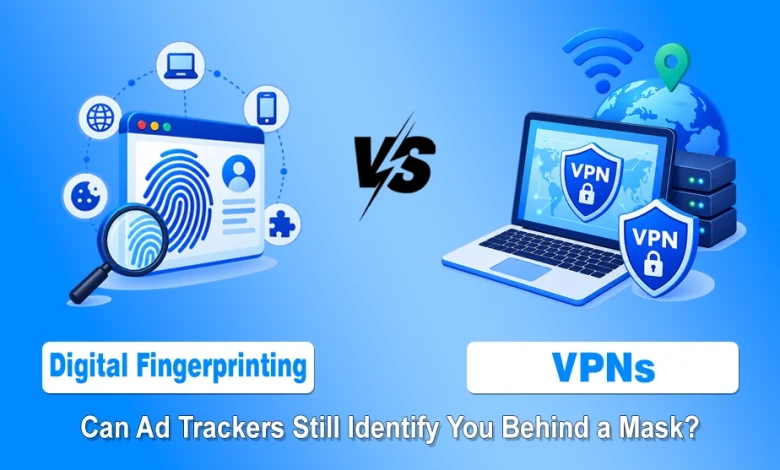
A VPN can change the IP address websites see, but it does not automatically make a browser invisible to advertisers. That is the privacy mistake many users make.
They turn on a VPN, see a different country in an IP checker, and assume the tracking problem is solved. In reality, ad networks often use more than location.
They look at the browser, device settings, screen details, language, extensions, time zone, and other small signals that can still form a recognizable digital fingerprint.
This matters because modern tracking rarely depends on one clue. Cookies, pixels, device IDs, IP addresses, fingerprinting scripts, analytics tags, and hidden telemetry can work together.
A VPN helps with the network side of privacy, especially on public Wi-Fi and against ISP-level monitoring, but advertisers may still recognize the browser if the same fingerprint keeps appearing across websites.
Why Changing Your IP Address is Only One Layer of Privacy
A VPN changes the public IP address by routing traffic through a VPN server before it reaches websites and online services. That can hide the user’s home network location from the sites they visit and protect traffic from people watching the local network. For anyone using hotel Wi-Fi, airport Wi-Fi, shared offices, or unsecured public hotspots, that protection is useful.
The problem arises when people mistakenly believe that the IP address represents their entire online identity. It is not. A website can still receive browser and device information during a normal visit.
Some of that data helps pages work properly. A site may need to know screen size to load the right layout, browser type to support features, language settings to choose content, or graphics capability to render interactive elements. Trackers can collect those pieces and combine them.
This is why a VPN with a built-in ad blocker can be more useful than a basic IP-masking tool. The VPN handles the encrypted route, while the ad and tracker blocker can reduce the scripts, banners, pixels, and third-party requests that try to collect identifying data in the first place. The goal is not invisibility. The goal is to give trackers fewer signals to work with.
What a Digital Fingerprint Actually Includes
A digital fingerprint is a profile made from small technical details that a browser and device reveal during normal web use. One detail alone may be harmless. Combined, those details can become specific enough to recognize the same browser again.
Trackers may look at signals like:
- browser name and version
- operating system
- screen size and resolution
- device type
- language settings
- time zone
- installed fonts
- graphics rendering behavior
- audio processing behavior
- enabled browser features
- extensions or extension behavior
- cookie and storage settings
- touch support and hardware hints
The danger is the combination. Millions of people may use the same browser, but fewer have the same browser version, same screen size, same time zone, same language, same graphics behavior, and same extension setup. Add enough details, and the browser becomes more distinctive.
How Ad Trackers Follow Users Across Websites
Most websites do not run every ad, analytics, and tracking system themselves. They load third-party scripts from ad networks, measurement companies, social platforms, affiliate systems, heatmap tools, and data brokers. Those scripts can appear across many unrelated websites.
If the same third-party tracker loads on a news site, a shopping site, a software blog, and a travel page, it can compare visits. When cookies are available, tracking is easier. When cookies are blocked, fingerprinting can still help connect sessions.
A basic tracking chain often looks like this:
- The user visits a website.
- The website loads third-party ad or analytics scripts.
- Those scripts collect browser and device signals.
- A profile is created or updated.
- The user visits another website with the same tracker.
- The tracker compares the new visit with earlier signals.
- Ads, recommendations, or retargeting campaigns follow the user.
VPNs, Ad Blockers, and Tracker Blockers Compared
A VPN and an ad blocker solve different parts of the problem. Treating them as the same tool leads to weak privacy decisions.
| Tool | What does it help with | What it does not fully solve |
| VPN | Hides home IP from websites, encrypts traffic on local networks, reduces ISP-level visibility | Browser fingerprinting, logged-in account tracking, and tracking scripts already loaded in the browser |
| Ad blocker | Blocks many intrusive banners and ad requests | Network-level privacy, public Wi-Fi exposure, every analytics script |
| Tracker blocker | Reduces third-party tracking scripts and pixels | All fingerprinting methods, account-based tracking, and device-level identifiers |
| Privacy-focused browser settings | Limits some browser signals and storage | VPN routing, app traffic, poor extension choices |
| Cookie clearing | Removes stored identifiers | Persistent fingerprint patterns and logged-in profiles |
Why Built-in Blocking Can Make a VPN More Useful
A VPN that only changes the IP address leaves the browser exposed to the same scripts it always loads. That is fine for some use cases, but it is incomplete for ad tracking.
The real privacy gain comes when the VPN route is paired with filtering that blocks known ad domains, tracker domains, malicious pages, and invasive third-party calls before they fully load.
This approach has several practical benefits. Pages may load with fewer banners. Trackers get fewer chances to collect browser signals. Hidden pixels and telemetry requests may be blocked before they report back. Malvertising risk can also drop when suspicious ad infrastructure is filtered.
What VPNs Cannot Hide From Advertisers?
A VPN does not erase everything. Users should understand the limits before relying on it.
A VPN cannot hide activity from a website where the user is logged in. If someone signs into a shopping account, email account, social media profile, or streaming account, that service knows the account identity regardless of IP address.
A VPN also cannot automatically change the browser’s fingerprint. If the same laptop, same browser, same extensions, same time zone, and same screen profile appear again and again, trackers may still connect those visits.
It also cannot stop all tracking inside apps. Mobile apps can use account data, advertising IDs, device permissions, SDK analytics, and push notification tokens. A VPN protects the route, but app-level tracking may continue unless the user changes app permissions and privacy settings.
A Practical Privacy Setup For Everyday Browsing
Most users do not need an extreme setup. They need a realistic one that lowers tracking without making the web unusable.
Start with a VPN on public Wi-Fi and untrusted networks. If you are setting up protection across your devices for the first time, follow NogenTech’s step-by-step guide on how to use a VPN effectively.
Add ad and tracker blocking. Use a browser with strong privacy settings.
Keep extensions limited because every extension can make the browser more unique. However, installing trusted VPN extensions for Chrome can give you easy control over browser-level proxies and privacy settings.
Log out of accounts when researching sensitive topics or comparing products. Avoid accepting notification prompts from websites that do not need them.
A simple checklist works well:
- Turn on the VPN before using public Wi-Fi.
- Enable built-in ad and tracker blocking.
- Use one privacy-focused browser profile for sensitive browsing.
- Disable unnecessary extensions.
- Clear site data for websites that track too aggressively.
- Block third-party cookies where possible.
- Avoid logging into personal accounts during private research.
- Test the browser fingerprint with a privacy testing tool.
- Keep the browser updated.
- Review app permissions on mobile devices.
How to Test Whether Trackers Still Recognize You
Users can run a quick privacy check without becoming security experts. First, turn on the VPN and confirm the public IP address has changed.
Then run a DNS leak test to make sure the device is not still using the local internet provider’s resolver. After that, use a browser fingerprinting test to see how unique the browser looks.
The result may be uncomfortable. Many browsers still appear unique even when the IP changes. That does not mean the VPN failed. It means the browser is still revealing details that the VPN was never designed to change.
Try the test again after turning on tracker blocking, disabling unnecessary extensions, and using a privacy-focused browser profile. The fingerprint may become less exposed or less consistent. That is a better goal than chasing total invisibility.
The Smarter Way to Think About VPN Privacy
The biggest myth about VPNs is that one switch solves every privacy problem. It does not. A VPN is a strong tool for network privacy, but advertising tracking happens inside the browser and across websites too.
IP masking helps, but scripts, fingerprints, cookies, accounts, and telemetry can still identify patterns.
The better approach is layered privacy. Use a VPN to protect the connection. Use built-in ad and tracker blocking to cut down the collection layer.
Use browser settings to reduce fingerprinting signals. Use account discipline so every visit does not tie back to the same identity.
For NogenTech readers who care about web security, digital marketing, and everyday privacy, this distinction is worth remembering: advertisers do not need to see your real IP address if your browser keeps introducing itself the same way on every site.
Change the route, reduce the trackers, and make the fingerprint harder to read. That combination gives users a much stronger privacy posture than a VPN alone.