How Microsoft Dynamics 365 Users Can Evaluate Sourcing Software Alongside Their ERP
A practical guide to evaluating sourcing solutions, managing suppliers, and improving procurement efficiency without disrupting existing ERP workflows.

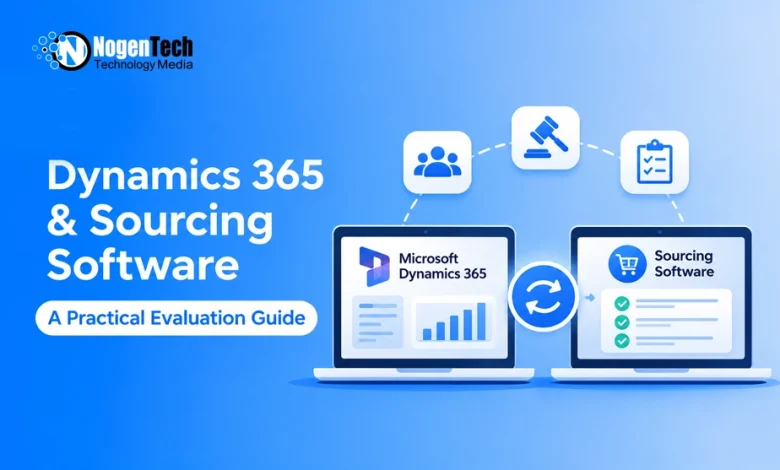
Businesses use Microsoft Dynamics 365 to manage financials, inventory, purchasing, and operational information. However, some supplier selection and sourcing tasks may require capabilities beyond those offered by traditional ERP software.
Procurement teams often rely on spreadsheets and emails to manage supplier negotiations, quotation requests, and bid comparisons. This can make it difficult to maintain accurate supplier data and track sourcing decisions.
This guide explains how to evaluate sourcing software alongside Microsoft Dynamics 365, compare supplier management features, assess integration requirements, and improve procurement processes without disrupting existing workflows.
Why Microsoft Dynamics 365 Users May Need Additional Sourcing Capabilities
Microsoft Dynamics 365 provides core procurement and sourcing capabilities, alongside financial management, inventory control, and supplier record management. However, some organizations may require more advanced tools for supplier discovery, competitive bidding, sourcing events, and supplier evaluation to address complex procurement requirements.
Businesses frequently run supplier negotiations, requests for quotes (RFQs), and compare vendors on spreadsheets, emails, or disparate systems. These processes can be challenging to keep supplier data up to date, perform a precise bid evaluation, and monitor sourcing decisions.
In these scenarios, sourcing software can be integrated into a current ERP to offer better tools for handling sourcing tasks without disrupting the existing system to support financial and operational transactions in the main ERP system.
What Should Sourcing Software Add to Dynamics 365?
Businesses should first decide which of their procurement activities are working well and which are not in their existing ERP, before comparing various solutions and evaluating their needs.
Supplier Discovery and Qualification:
Businesses will probably require instruments to be able to find potential suppliers, to obtain supplier details, to evaluate the qualifications of suppliers, and to compare vendors with the standards set by the business. Having all the information about suppliers at once can assist procurement teams in making better decisions and help them keep the same standards for evaluating suppliers.
RFQ and RFP Management:
Email correspondence with people who are asking for quotations and proposals can lead to a lot of administrative tasks. Sourcing events can be organized, requirements can be sent out, responses from suppliers can be gathered, and bids can be compared on a single platform.
Supplier Performance Evaluation:
When assessing supplier reliability, pricing, quality, delivery, and compliance, procurement teams should look at how they evaluate suppliers. Regular supplier assessments can help businesses identify potential supply chain risks and make more informed purchasing decisions.
How to Evaluate Sourcing Software Alongside Your ERP:
To select the right solution, it’s important to understand how the solution can help you with your procurement process and how it fits in with your current business systems.
1. Identify Your Procurement Requirements:
First, look at the existing sourcing process. Determine tasks that require manual data entry, communication with suppliers, spreadsheet comparisons, approvals, etc. Identify the value your company can get from supplier discovery, bidding management, contract coordination, spend analysis, supplier performance reporting, or procurement automation. Focus on abilities that can solve actual problems in practice, and avoid choosing features that you will never employ.
2. Evaluate Integration With Microsoft Dynamics 365:
One of the most vital criteria you should consider for ERP compatibility is its ability to support your company’s existing operations. The answers have to enable consistent data flow between sourcing initiatives and current Dynamics 365 settings.
Think about what supplier records, item data, purchasing needs, approvals, and purchase orders will need to be transferred between systems. Inquire from the vendors about the APIs that are available, how to integrate, the frequency of synchronization, what they might need to do to implement, and any limitations. Good integration minimizes data replication and ensures the consistency of procurement data throughout the organization.
3. Compare Supplier Evaluation and Collaboration Features
Identify features that assist procurement teams with supplier communication, comparing quotes, reviewing proposals, and tracking sourcing decisions. The ideal sourcing software should enable structured comparisons of suppliers, transparent criteria for evaluation, and collaborative workflows. These features can assist purchasing groups in making clear choices and minimizing the time spent arranging supplier responses.
4. Assess Reporting and Spend Visibility:
The procurement teams require dependable information to gain insight into purchasing trends and opportunities to improve. Assess supplier pricing, purchasing categories, contract performance, supplier reliability, and spending trends reporting capability.
Think about whether the platform offers beneficial dashboards or if information needs to be exported to other reporting products. Improved spend visibility can help with negotiating with suppliers, budget planning, and strategic sourcing.
How to Compare Sourcing Solutions Before Making a Decision
When you are evaluating sourcing software, check if the software can accommodate your existing procurement procedures and future expansion. Don’t accept feature lists as a demonstration.
Request vendors to show you how they onboard suppliers, create an RFQ, compare bids, and how it works with Dynamics 365. Determine the amount of training required for employees and whether it is an easier way to accomplish the current tasks.
Factor in licensing fees, setup costs, support costs, data transfer costs, and resource demands to keep the integration going. Strategies for mitigating disruptions in procurement workflows.Tips to minimize disruptions in the procurement process.
How to Avoid Procurement Workflow Disruptions
Before implementation, determine who will be responsible for supplier information, sourcing events and approvals, purchasing records, and financial transactions. Declare data ownership and synchronization-specific roles.
Test integration processes in advance of deployment. Ensure the transfer of supplier data, sourcing outcomes, approvals, and purchasing information is accurate. Clear process documentation and training can assist employees to accept the new solution with a minimum of disruption.
Final Thoughts
While Microsoft Dynamics 365 can offer an excellent starting point for procurement and business operations, there are organizations that require more. Some organizations are looking for extra capabilities in supplier discovery, competitive sourcing, bid evaluation, and collaboration in procurement.
When businesses assess sourcing software with their ERP, they can discover workflow gaps, how well suppliers manage inventory and business processes, and determine their needs for integration. The ideal solution will integrate with Dynamics 365, enhance sourcing visibility, minimize manual effort, and enable better-informed procurement decisions without adding to the complexity.