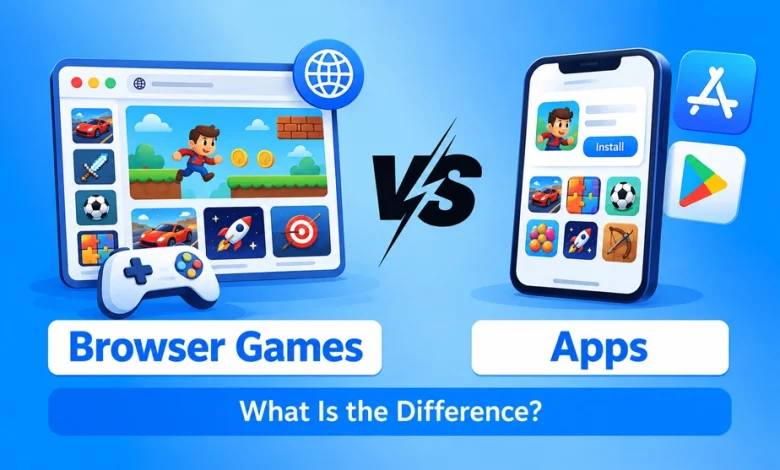
Browser games open through a website, while native gaming apps are installed on your device. That is the main difference, but it affects how quickly you can start, how much storage a game uses, and which device features it can access.
| Feature | Browser games | Native gaming apps |
|---|---|---|
| Getting started | Open a link in a browser | Download and install an app |
| Storage | Use browser storage and cached files | Use storage for the installed app and its data |
| Updates | Usually load through the website | Usually arrive through an app store |
| Offline play | Available only if the game supports it | Available only if the app supports it |
| Performance | Depends on the browser, device and game | Can be optimized more closely for a device |
| Device features | Access varies by browser and operating system | Can offer deeper device integration |
Neither format is always better. The right choice depends on the game you want to play and how you use your device.
Do Browser Games Need to Be Installed Like Apps?
Usually, no. You can open a browser game on its website without installing a separate app. A native gaming app must be downloaded and installed on your device before you play.
That does not mean browser games download nothing. The browser loads the game’s images, scripts, audio, and other files, and may save some for later visits. Native apps also download files, either during installation or when the game first opens.
The difference is that browser games generally run without a separate installation, while native apps require one.
How Do Browser Games and Apps Run on Your Device?
Browser games use web technologies: HTML structures the game, JavaScript handles interactions, and WebGL can render 2D and 3D graphics. Native gaming apps run as installed software built for a device’s operating system, often using a game engine.
Both formats can reach phones and computers. For cross-platform gaming, developers still need to account for differences in browsers, operating systems, screen sizes, and controls. That is why the same game may look or perform differently across devices.
Can a PWA Give a Browser Game App-Like Features?
Yes. A Progressive Web App (PWA) can let a browser game appear on the home screen and store files for faster loading or limited offline play. Some PWAs can also send notifications. Which features work depends on the game, browser, and operating system.
A PWA uses service workers to manage network requests and cached files. Google’s PWA caching guide explains how selected assets can be stored on the device.
This can reduce reliance on a connection, but it does not make every game playable offline. Multiplayer games and features that need a live account or server data still require internet access.
Are Browser Games Faster Than Apps?
Browser games can be quicker to start playing for the first time because they do not require a separate app installation. Once a native app is installed, however, opening it may be just as quick.
Gameplay speed depends on the device, graphics, available memory, and how well the game is optimized. A lightweight browser game may run smoothly on modest hardware, while a demanding game may perform better as a native app built for that platform. If the connection is the constraint, choosing lighter browser games for slow internet may help more than choosing a format alone.
Do Browser Games Take Up Less Storage Than Apps?
They can, but it depends on the game. A native app uses space for its installation and game data. A browser game can store images, audio, scripts, and preferences in the browser’s cache, so it also uses phone storage.
The amount of cached data varies. As web.dev’s caching guide explains, files saved for faster loading or offline access still take up space on the device.
If storage is limited, a browser version may avoid a large app installation. It should not, however, be treated as a zero-storage option.
How Do Websites and Apps Give Players Access?
Browser access reduces the steps between finding a game and opening it. Instead of finding an app, downloading it, and installing it, a user can open the website and sign in.
Real-money gaming provides one example. A returning user using a Vegastars login can access the platform through its website rather than first being directed through a separate app installation.
The relevant technology advantage is direct web access. It does not mean a browser platform is automatically faster, safer, or better than a native app.
How Are Browser Games and Apps Updated?
Browser-game developers can publish changes on the website, and players generally receive the new version when they return. Native apps typically receive new versions through an app store, often through automatic updates.
Neither process is completely hands-off for developers. A web game must manage cached files so players do not keep loading an old version. As the web.dev PWA caching guide explains, changing a file on the server does not automatically replace its cached copy.
Are Browser Games Safer Than Apps?
Neither format is automatically safer. A website can be malicious or poorly secured, while an app downloaded from an untrusted source can also put a device or account at risk.
Check the website address or app publisher before playing. Review permission requests and how the platform handles account and payment details.
For real-money games, check whether the service is permitted and appropriately licensed where you live, regardless of how you access it.
Do Browser Games and Apps Follow the Same Rules?
They can face different distribution requirements. A browser game can be offered through a website without an app-store listing. An app distributed through the App Store or Google Play must meet that store’s applicable policies.
For real-money gaming apps, Apple’s guidelines and Google Play’s policy set requirements that include licensing and location restrictions. A website does not need an app-store listing, but browser access does not remove applicable gambling laws, age limits or licensing requirements.
When Might a Browser Game Be a Better Fit?
A browser version may suit occasional play, quick access from a link or a device where you do not want another app installed. If you use several devices, a website may also be convenient, though access to your progress depends on the game’s account features.
Some browser games offer a PWA option with a home-screen icon or limited offline features. Those features depend on the game and device.
When Might a Native App Be a Better Fit?
A native app may suit a game you play regularly, particularly if its app version offers better controls, graphics, offline play or device features than its browser version.
Installation also gives the game a dedicated place on your device. Whether that is worthwhile depends on the app’s storage use and the features it actually provides.
Browser or App: Which Version Should You Choose?
Compare the two versions of the game you want to play. Check how they perform on your device, how much space they use, whether they work offline and whether they offer the same features.
Browser games make access through a website possible; native apps offer an installed experience. Neither format guarantees better performance, safety or convenience for every game.
Responsible Gambling: Real-money gambling is intended only for adults who meet the legal gambling age where they live. Treat it as entertainment, set spending limits and seek support if gambling becomes difficult to control.