If you stream movies, shows, or videos online, you are leaving digital footprints behind. Every tap, pause, search, and binge session feeds into a larger data ecosystem. I am not saying this to alarm you. I am saying it because most people underestimate how much information streaming apps collect.
Whether you are watching on Netflix, browsing clips on YouTube, or trying out a new third-party streaming platform, tracking is happening in the background. The good news is that you are not powerless.
In this guide, I will take you through practical steps you can take to limit tracking and protect your privacy while still enjoying your favorite content.
Why Streaming Apps and Platforms Track You?
Streaming platforms collect data primarily for personalization, advertising, and analytics.
When a streaming platform recommends a show, it relies on your viewing history. Ad-supported services use behavioral data to serve targeted ads. Companies also track user behavior to measure engagement and improve performance.
The issue goes beyond these unofficial streaming mirrors. They integrate third-party tracking tools for advertising networks and analytics providers. That means your data may be shared across multiple companies you have never directly interacted with.
How You Can Limit Tracking on Third-Party Apps for Privacy First Streaming?
Previously, I told you about the importance of privacy-first streaming. Understanding this ecosystem helps you see why privacy settings matter.
1. Device Level Privacy Settings: Your First Line of Defense
Your device is the foundation of your privacy strategy. Before worrying about advanced tools, you should make sure your smartphone, tablet, or TV is not sharing more data than necessary. These built-in settings are often overlooked, yet they are powerful.
a) Adjust Privacy Settings on iPhone and iPad
- If you use iOS, start with App Tracking Transparency. When apps request permission to track your activity across other apps and websites, choose Ask App Not to Track unless you have a strong reason to allow it.
- Next, review Location Services. Most streaming apps do not need precise location access. Set them to While Using the App or disable location entirely if it is not required.
- Also, check Analytics and Improvements. You can limit how much diagnostic and usage data is shared with developers.
These small changes reduce background data flow without affecting your ability to stream content.
b) Lock Down Android Privacy Controls
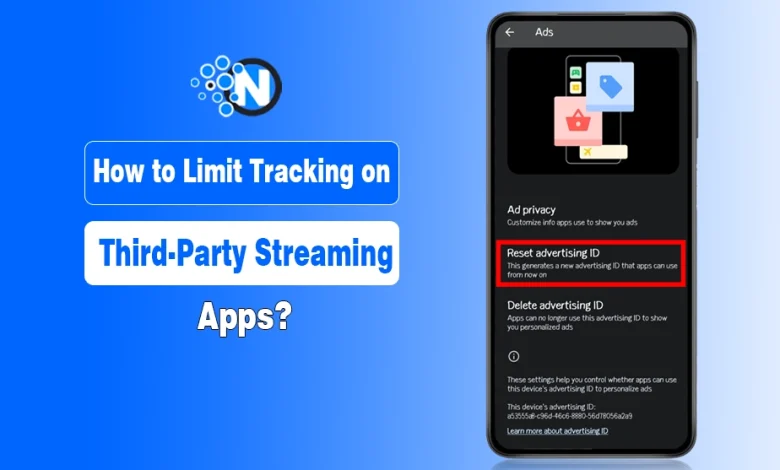
- On Android devices, open Settings.
- Choose Privacy.
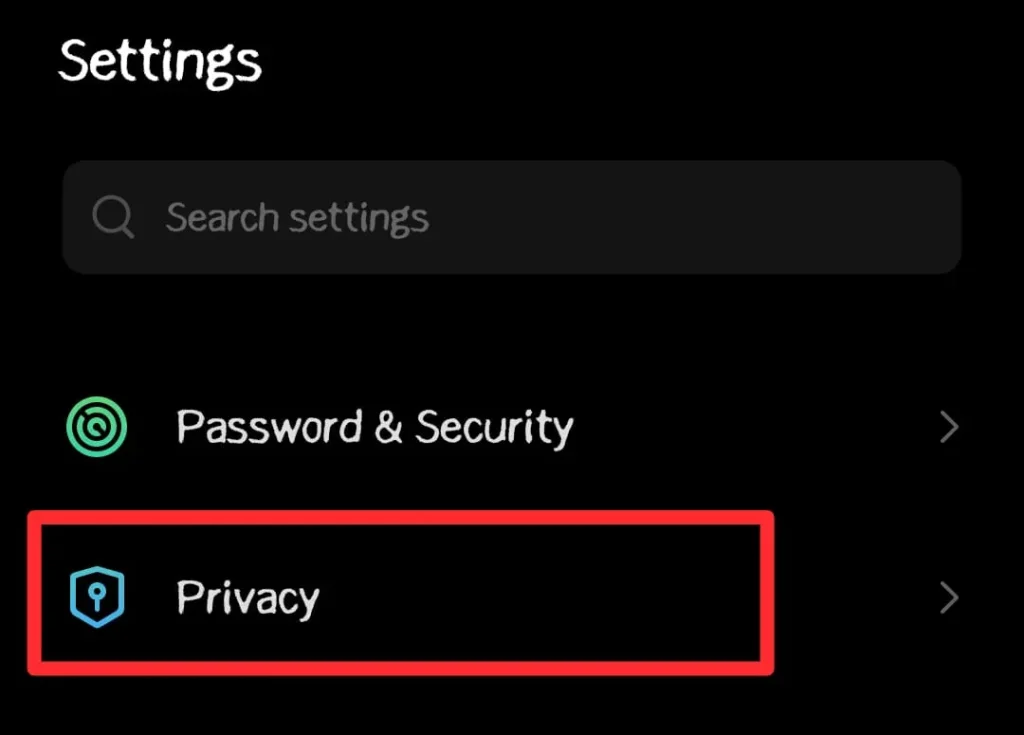
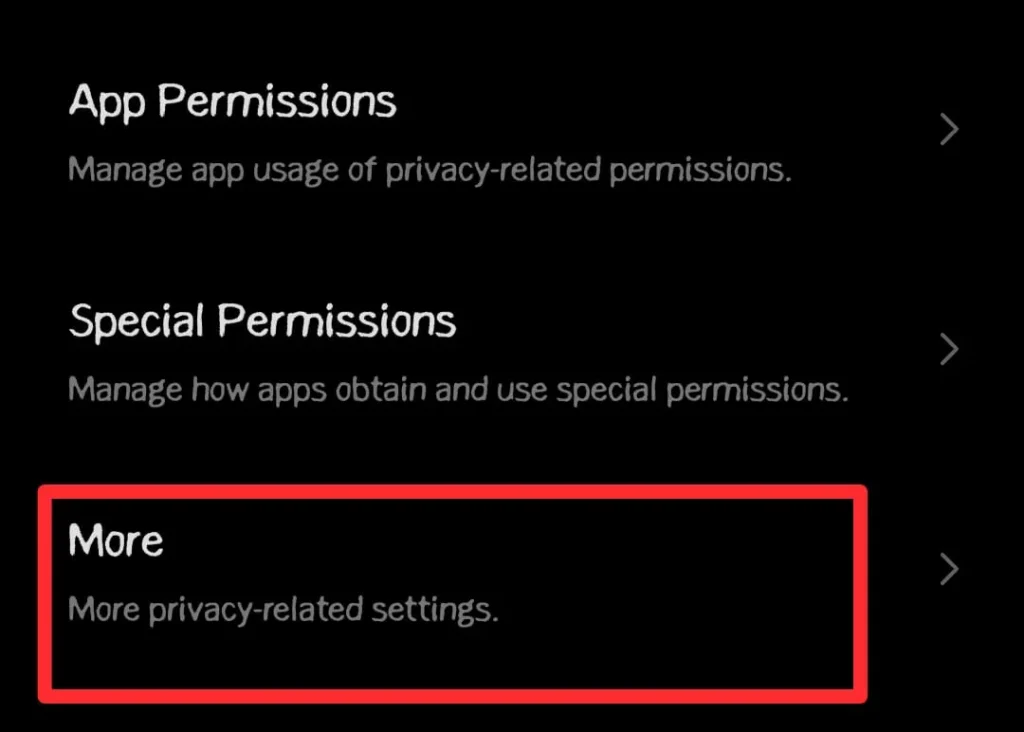
- Go to the More section.
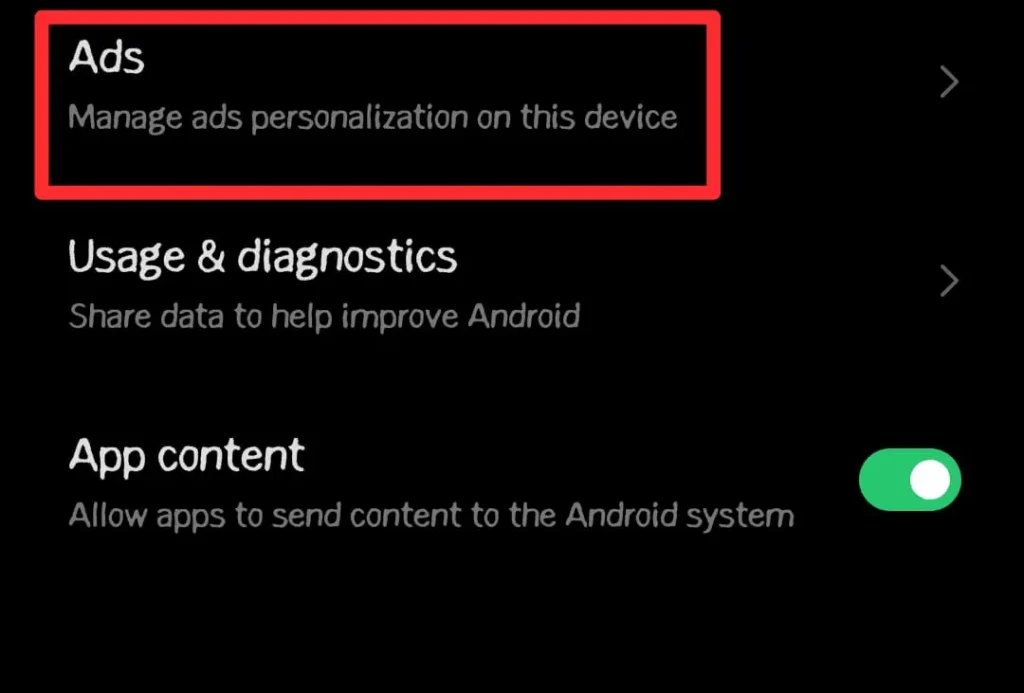
- Navigate to Ads and tap on it.
- Reset your advertising ID or disable ad personalization where possible.
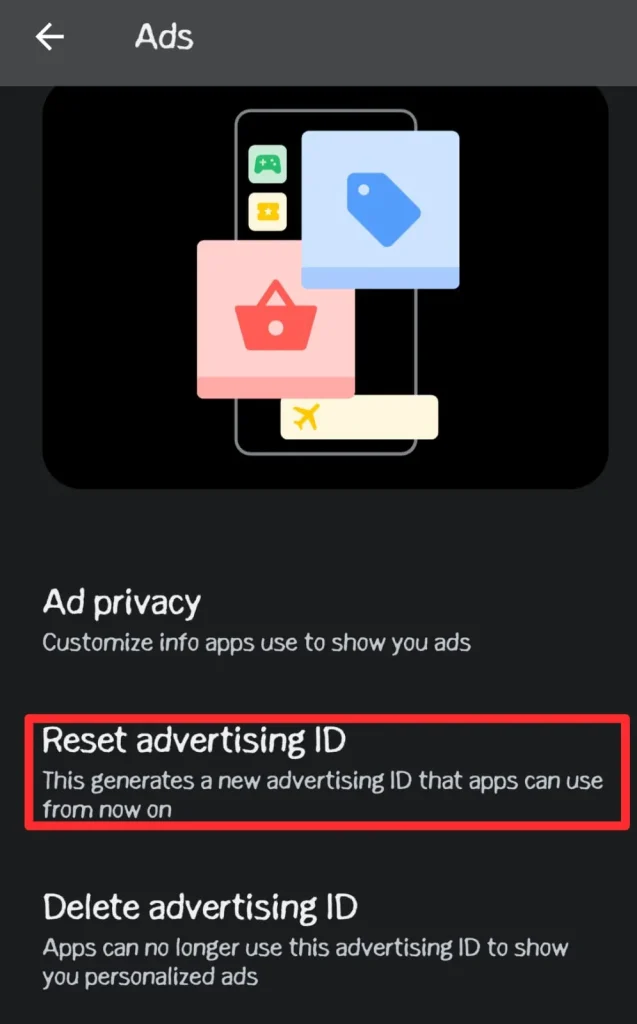
This makes it harder for apps to build a consistent advertising profile around you.
Review app permissions carefully. Streaming apps rarely need constant access to your microphone, camera, or precise location. Grant only what is essential.
If you use services connected to Google, review your account dashboard and adjust Web and App Activity settings. Pausing unnecessary tracking can significantly reduce cross-app profiling.
c) Smart TV and Streaming Device Settings
Privacy does not stop at your phone. Smart TVs and streaming devices such as Roku, Amazon Fire TV, and Apple TV also collect viewing data.
- Look for options labeled advertising, privacy, or data collection.
- Disable personalized ads where possible.
- Turn off automatic content recognition if your TV supports it, since this feature can analyze what you watch across different inputs.
Checking these settings ensures that your living room is not quietly feeding data into marketing systems.
2. VPN Pointers: How to Use Them Wisely
A VPN can be useful, but only if you understand what it does and what it does not do. It is not a magic invisibility cloak. It is one layer in a broader privacy strategy.
a) Choose a No Logs VPN
When selecting a VPN, look for a clear no-logs policy. Ideally, the provider should have independent audits verifying that it does not store connection logs, browsing history, or IP addresses.
Be cautious with free VPN services. Many free providers monetize user data, which defeats the purpose of seeking privacy in the first place. Always review the company’s privacy policy before subscribing.
b) Understand the Limits of a VPN
When you use a VPN, it hides your IP address from the websites you visit and encrypting traffic between your device and the VPN server.
However, it does not stop a streaming platform from tracking activity within your logged in account. If you log into Hurawatch, your watch history is still recorded. A VPN also does not automatically block cookies or browser fingerprinting techniques.
This is why you should see a VPN as one component of a layered approach rather than a complete solution.
c) When to Use a VPN for Streaming?
VPNs are particularly useful on public WiFi networks, where traffic can be more vulnerable to monitoring. They can also reduce IP-based profiling by your internet provider.
At home, some users install VPN software directly on their router so that all connected devices benefit from encrypted traffic. This can be helpful if you stream on multiple devices.
Use a VPN strategically, not blindly.
3. Cookie Hygiene: Manage the Data You Leave Behind
Cookies play a major role in online tracking. While they help websites remember your preferences, third-party cookies allow advertisers to follow you across different sites. Managing them properly can significantly reduce tracking.
a) Block Third-Party Cookies in Browsers
Most modern browsers allow you to block third-party cookies. In privacy settings, enable options that prevent cross-site tracking.
- Privacy-focused browsers such as Mozilla Firefox offer Enhanced Tracking Protection.
- Brave blocks many trackers by default.
When you use these tools, it limits the amount of advertising data shared across websites.
b) Clear Cookies Regularly
Even with protections in place, cookies can accumulate over time. You should clear cookies periodically or configure your browser to delete cookies when you close it.
It reduces long-term tracking by forcing websites to treat you as a new session user. While it may require signing in again, the privacy trade-off is often worth it.
c) Handle Cookie Consent Banners Wisely
When you encounter cookie consent banners, avoid clicking Accept All automatically. Instead, choose Manage Preferences and disable optional tracking categories.
Taking a few extra seconds to customize settings can prevent unnecessary data sharing with advertising partners and analytics companies.
4. Account Hygiene: Reducing Data Within Streaming Platforms
External tracking is only part of the picture. Streaming sites also maintain internal data about your behavior.
- Review your watch history and delete entries if the platform allows it.
- Also, you can pause or auto-delete watch history on your browser after a certain period.
- Avoid linking streaming accounts with social media unless absolutely necessary.
- Limiting integrations reduces cross-platform data sharing.
You can also use separate email addresses for different services to prevent easy data aggregation across platforms.
5. Advanced Layer: DNS and Network Level Controls
If you want stronger protection, consider network-level filtering. Some DNS services block known advertising and tracking domains before they even load.
- On Android devices, you can configure a private DNS provider.
- On home networks, advanced users can set up router-based filtering tools to block tracker domains for all connected devices.
This approach works across apps and browsers, adding another layer of defense against third-party tracking.
Final Thoughts
Streaming is part of modern life, and there is no need to give it up to protect your privacy. What matters is taking control of the settings and tools available to you.
When you start adjusting device-level permissions, using a carefully selected VPN, practicing good cookie hygiene, and managing your streaming account data, you can significantly reduce third-party tracking.
You do not need advanced technical skills. You simply need awareness and a willingness to review your digital habits. Start with one setting today and build from there. Small actions compound into meaningful privacy protection over time.