What is Yandex Images and How to Use It for Reverse Image Search
Search by keyword or upload an image to find similar pictures, identify objects, trace image sources, and discover where images appear across the web.


Sometimes, you have an image but don’t know where it came from or where else it appears online. Instead of trying different keywords to describe it, you can simply search with the image itself.
This is where Yandex‘s Images comes in. Its search-by-image feature lets you upload a photo and look for exact copies, visually similar images, and related results across the web.
The feature is still operational, but the way Yandex image search works and appears has changed over time. So, in this guide, I’ll show you how to use Yandex reverse image search, how to upload an image, how it works, and what you can find with it.
What is Yandex Images?
Yandex Images is the image search service of Yandex that lets you find pictures using keywords or search with an existing image.
The second method is commonly known as Yandex reverse image search or Yandex search by image. Instead of entering a text query, you provide Yandex with a picture, and it searches for visual matches.

Yandex officially states that its image search uses computer vision algorithms and can return both exact copies and visually similar images. So, if you have a picture but don’t know the right words to search for it, the image itself can become your search query.
How Does Yandex Image Search Work?
A normal Yandex image search starts with words. For example, you type the name of an object, person, place, or topic and get related pictures. Yandex search by image works the other way around.
You provide an existing image, and Yandex analyzes its visual characteristics to look for matches. This approach is generally known as content-based image retrieval, where images are retrieved based on their visual content rather than relying only on text.
According to Yandex, its computer vision technology can find exact copies of the uploaded image as well as visually similar pictures.
This means your results are not limited to identical copies. You may also discover similar-looking images and other relevant visual results.
This visual-matching ability is also what makes Yandex useful when you don’t know exactly how to describe what is shown in a picture.
How to Use Yandex Reverse Image Search
Using Yandex Images reverse image search is simple. You can upload a picture and let Yandex look for exact or visually similar images.
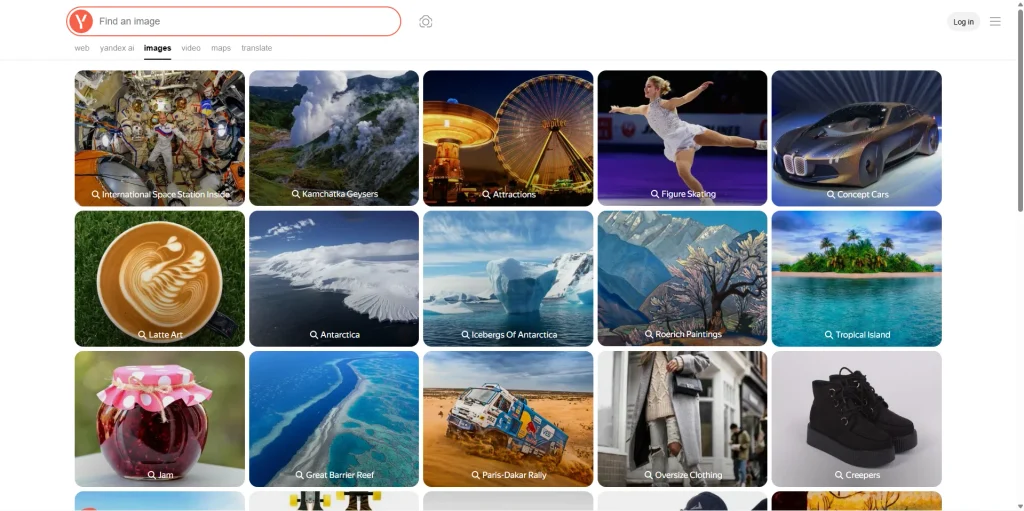
1. Open Yandex Image Search
Open Yandex Images and click the small camera/visual search icon next to the search bar. This opens the Visual search panel, where you can start searching with an image instead of typing keywords.
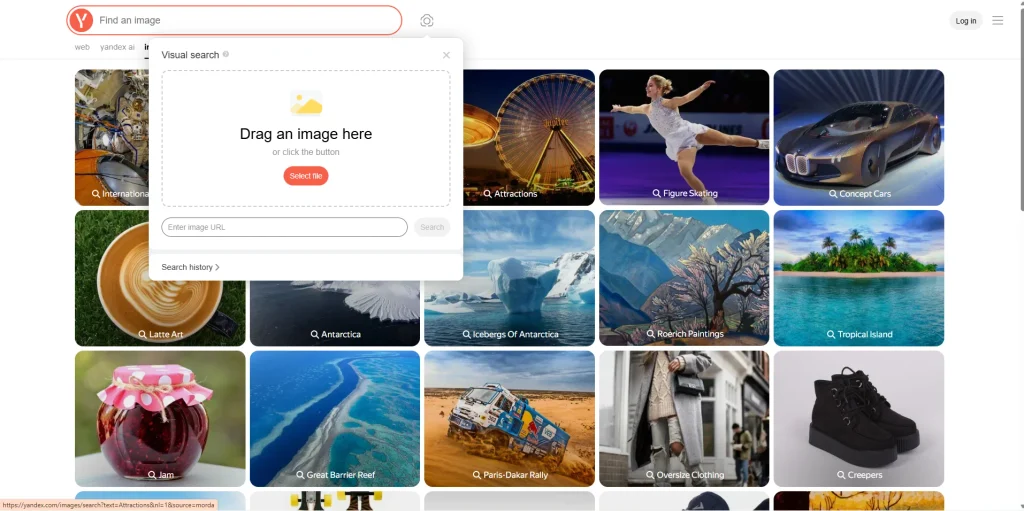
2. Upload Your Image
Yandex gives you multiple ways to provide the image:
- Drag an image directly into the upload area.
- Click Select file to choose an image from your device.
- Paste an image URL into the field and click Search.
- You can also access Search history from the same panel if you want to revisit previous visual searches.
Once the image is added, Yandex processes it and opens the visual search results.
3. Review the Results
After Yandex analyzes the image, the results page gives you several ways to explore the match. On the left, Smart Camera shows the uploaded image and lets you adjust the frame to focus on a specific part of it.
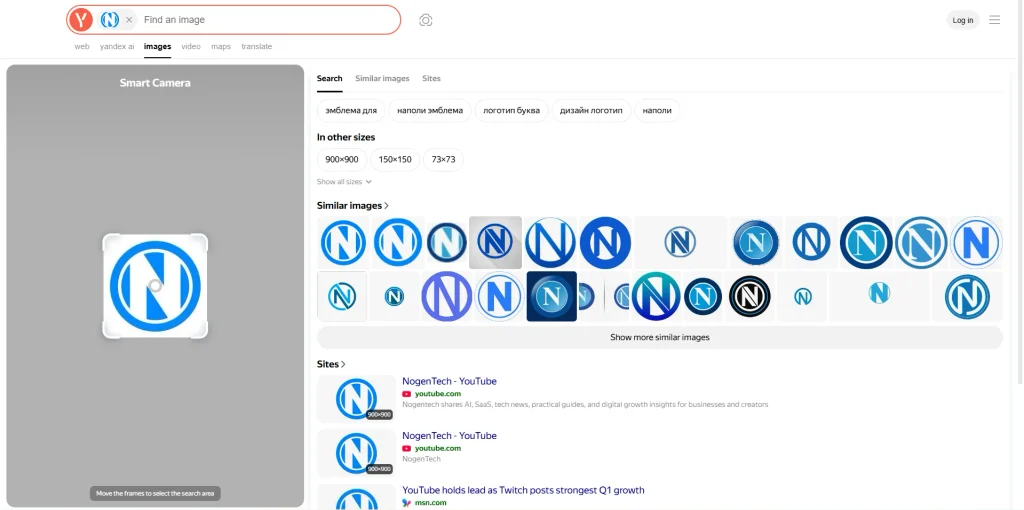
On the right, you can switch between:
- Search – general results and related search suggestions.
- Similar images – visually similar versions of the uploaded image.
- Sites – webpages where matching or similar images appear.
Yandex may also show the image in other available sizes, along with a gallery of similar images. If you want more results, you can use the Show more similar images option. The Sites section is especially useful when you want to check where the image or a similar version has been published online.
4. Check the Source Websites
Open the Sites results to see webpages containing the same or visually similar images. This can help you find more information about the picture and where different versions appear online.
However, Yandex cannot always confirm the original source of image. If that is your goal, compare publication dates, image quality, and page context instead of assuming the first result published the image first.
What Can Yandex Reverse Image Search Find?
The main Yandex reverse image search features are built around visual matching. It can find exact copies and visually similar images, recognize individual objects within an image, and show websites containing similar pictures.
The results can include:
- About the image – information related to the recognized object.
- Similar – visually similar images or items.
- Sites – webpages containing similar images.
For example, if you have a picture of an object you don’t recognize, you can use the image itself instead of guessing its name. If your goal is to find other versions of a picture, the Similar results can be more useful. And if you want to investigate where similar images appear online, check the Sites results.
How to Use Yandex Image Search on a Phone
According to Yandex Support, You can also search with an image on a phone.
In Yandex Browser app, open the image search option and either take a photo with your camera or select an existing image from your phone’s gallery.
Yandex can recognize objects in the image and provide results such as information about the object, similar images, and websites containing related pictures. You can then use the Similar and Sites sections to investigate the image further.
The available controls can vary slightly between Android, iPhone, and different versions of Yandex.
How to Get Better Results With Yandex Image Search
If your first Yandex image search doesn’t give you what you need, try making the visual query clearer.
Use the clearest and highest-quality version of the picture available to you. If there are several objects in the photo but you only care about one, focus on that specific object where possible.
Yandex also provides a Refine search field with similar-image results, which can help you make the search more specific. Also, remember that reverse image search and keyword search can work together. If the search engine helps you identify an object or gives you useful context, you can use that information as a keyword for a more specific search.
Overall, Yandex Images is most useful when you already have a picture but don’t know what to search for in words. Upload the image, review the visual matches, and check the Sites results when you want to investigate where similar images appear online.