Is xResolver Safe or Legal? What It Does for Xbox & PlayStation
xResolver is an online tool that links Xbox and PlayStation gamertags to IP addresses, which can expose players to privacy risks, DDoS attacks, and harassment. This guide explains how it works, the potential dangers, and effective ways to protect your gaming privacy.

Before you click on xResolver or type in an Xbox gamertag, it’s important to know exactly what you’re stepping into.
xResolver is an online tool known for linking Xbox gamertags to IP addresses, and while some users see it as a way to “expose” other players, many don’t realize the serious privacy, safety, and legal risks involved.
From DDoS attacks to online harassment, xResolver has become a controversial name in the gaming community. In this guide, we’ll break down what xResolver is, how it works, why people use it, and what you should consider before using it.
Is xResolver Safe or Illegal? (Quick Answer)
- Is xResolver safe? Not really, it can expose your IP and increase privacy risks
- Is xResolver illegal? Not always, but using it for harassment or attacks can be illegal
- Main concern: IP tracking, DDoS attacks, and misuse by other players
What is xResolver?
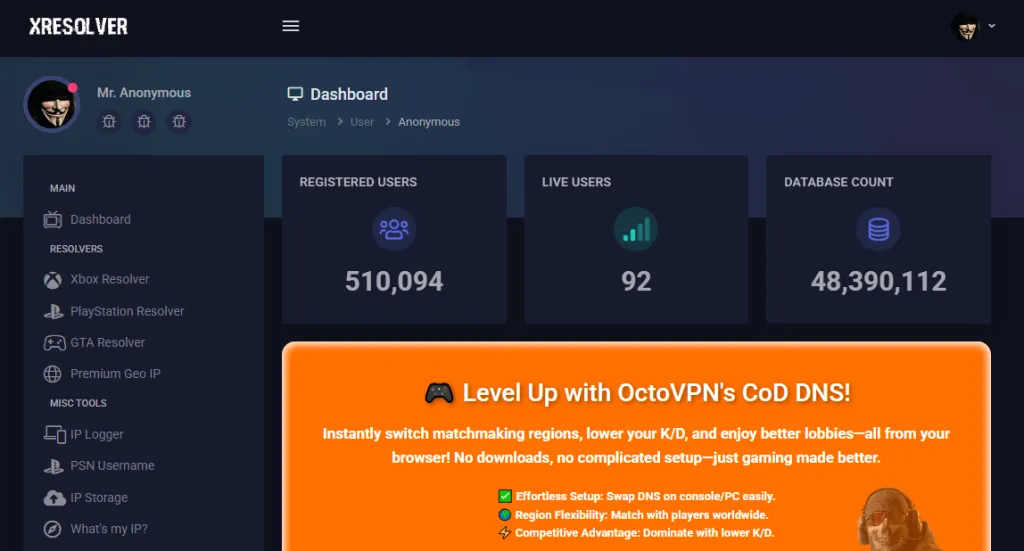
xResolver is an online tool that links Xbox and PlayStation gamertags to IP addresses collected from online gaming sessions.
It works by pulling data from third-party sources and past network logs to show the IP information linked to a specific gamer profile.
While some users claim it’s meant for “network troubleshooting” or identifying players, xResolver is widely criticized because it can expose a player’s location and internet details and increase the risk of harassment, DDoS attacks, and privacy violations.
Is xResolver Legal and Safe?
xResolver isn’t clearly illegal by itself, but it isn’t exactly safe either.
Technically, the service works by storing publicly collected IP addresses linked to Xbox and PlayStation gamertags.
Since IP addresses are not completely private, storing and linking them to gamertags raises serious privacy concerns and cybersecurity issues. So just operating the site doesn’t directly break most laws in many regions. However, this places it in a legal gray area rather than clearly legal territory.
Legality of xResolver
- Not outright illegal: xResolver doesn’t hack or steal data directly. It collects IP addresses from public game sessions using third-party sniffing tools like Octosniff.
- Legal gray zone: While it doesn’t violate laws in a strict sense, it facilitates behavior that can be illegal, such as DDoS attacks or harassment.
- Terms of service violations: Using tools to sniff IPs or expose user data often violates the terms of service of platforms like Xbox Live and PlayStation Network.
Safety Risks
- Privacy exposure: Linking Gamertags or PSN IDs to IP addresses can reveal a user’s approximate location and network details. Most gamers rely on home internet setups, which can make their IP address more consistent and easier to identify during repeated gaming sessions.
- DDoS vulnerability: Malicious users can use this data to launch denial-of-service attacks, disrupting gameplay or internet access.
- Harassment and stalking: Publicly exposing IPs can lead to targeted harassment, especially in competitive or toxic gaming environments.
- Youth risk: The platform is especially risky for younger gamers who may not understand the implications of IP exposure.
In the United States, using IP data for harassment, DDoS attacks, or stalking can lead to serious legal consequences.
Who Created xResolver?
xResolver is commonly associated with independent developers in the gaming and networking community and has been linked to groups like Octolus Development.
However, there is limited verified public information about its creators, as such tools are often developed and maintained anonymously.
This lack of transparency is common across many online platforms and tools used by gamers, similar to how different gaming services and platforms operate in the broader ecosystem.
Pros and Cons of xResolver
| Pros | Cons |
|---|---|
| Identify Suspicious Players | Potential for Abuse |
| Gamertag/PSN Lookup | Ethical Concerns |
| Blocklist Feature | Not Foolproof |
| Geo-location Info | |
| Free Basic Access |
What Does xResolver DO?
xResolver is a database-style tool that links Xbox gamertags to IP addresses. Its main function is to let users search a gamertag and view the IP information that has been previously captured through Xbox multiplayer sessions using packet-sniffing tools.
1. Geo Location Identification
xResolver provides geo-location identification of players by automatically detecting their IP address and displaying it on the website. This data is incredibly significant in terms of the IP address of the player, making it one of the most secret features.
2. Personal IP Address Blocklisting
Users can blocklist their personal IP addresses for better security while using the xResolver. This feature protects your personal data and IP address from any opponent, no matter their tech knowledge or capabilities.
3. PSN Username Resolver
xResolver comes packed with features to extract IP address information. You can easily search by either PSN usernames or Gamer tags, and get all the details you need in an instant.
4. IP Logging
xResolver provides you with the power to create personalized links in a way that gathers IP addresses when shared easily. Moreover, these customized URLs allow for a deeper understanding of browser and location information about those who click them.
How xResolver Works for Gamers?
xResolver works by collecting and displaying IP address data linked to Xbox gamertags, usually gathered from past online multiplayer sessions. When gamers play peer-to-peer games, their devices can briefly share network information over WiFi or other internet connections.
This data is captured using third-party packet-sniffing tools and later added to xResolver’s database.
- A user enters a Gamertag or PSN username.
- The tool searches its database of stored IPs.
- It returns the IP address and sometimes geo-location data.
- Users can then choose to blocklist their own IP for safety.
Since IP addresses are public by nature, xResolver does not technically “hack” them; it simply logs and organizes data already available online. This is more common in older Xbox and PlayStation games that use peer-to-peer connections instead of dedicated servers.
How to Hide Your IP From xResolver
If you want to hide your IP address from xResolver and protect yourself from potential threats (like a DDoS attack), you need to change your current IP address and then use a method to mask your future online activity.
- Use a reliable VPN while gaming. A VPN masks your real IP address and replaces it with a different one, so even if someone tries to capture network data during a match, they won’t see your actual IP.
- Avoid peer-to-peer (P2P) connections whenever possible. Many modern games use dedicated servers, which greatly reduces IP exposure. If a game forces P2P, the risk of IP logging increases.
- Remove your IP from xResolver’s database. xResolver offers a paid “IP removal” or whitelist option that hides your IP from public searches. While controversial, this is currently the only direct way to remove an already-listed IP.
- Change your IP address by restarting your router or contacting your internet service provider. This won’t remove old data from xResolver, but it makes previously logged IPs useless.
- Block known packet-sniffing tools and suspicious connections using your router firewall or console network settings, and avoid joining random party chats with unknown players.
Can xResolver Be Replaced? Safer Alternatives for Gamers
Instead of looking for direct xResolver alternatives that track other players’ IP addresses, it’s safer to focus on protecting your own privacy and connection while gaming online.
👉 This approach helps you avoid the risks associated with IP tracking tools while still improving your online security.
Here are safer and more recommended approaches:
1. Protect Your IP Address While Gaming
Using privacy tools like VPNs can help hide your real IP address and reduce the risk of exposure during online matches. (Already discussed above.)
2. Play on Dedicated Servers
Many modern games use dedicated servers instead of peer-to-peer connections, which significantly reduces the chances of your IP being exposed to other players.
3. Adjust Console Privacy Settings
Both Xbox and PlayStation offer built-in privacy controls that limit who can interact with you, helping reduce tracking attempts. Many players also improve their overall setup using the right gaming accessories to enhance both performance and security.
4. Avoid Suspicious Links and Party Invites
IP logging often happens through malicious links or unknown party chats, so it’s important to avoid interacting with untrusted players.
5. Contact Your Internet Service Provider
If you suspect your IP has been exposed, your ISP can help you change your IP address or improve your connection security.
👉 Bottom line:
There are no truly “safe” alternatives to xResolver that track other players’ IP addresses. The better approach is to focus on protecting your own data rather than trying to expose someone else’s.
My Final Opinion on xResolver
xResolver is not recommended for regular users. While it may seem like a useful tool, the risks related to privacy, security, and potential misuse outweigh its benefits.
The right approach is defensive, informed, and ethical: protect your own network, avoid retaliatory harassment, document abuse, and escalate to platform moderators or law enforcement where necessary.
For most gamers, avoiding such tools entirely and focusing on account and network security is the safest approach.
Frequently Asked Questions About xResolver
What is an Xbox IP resolver?
It’s a tool that attempts to link Xbox gamertags to IP addresses.
Is xResolver an IP puller?
Yes, it works as a database that shows IPs collected from gaming sessions.
Can someone get my IP from gamertag?
In some cases, yes, especially in peer-to-peer games.
Will xResolver show my exact home address?
No, resolvers show approximate geo-location (city/region) and ISP, not a precise street address.
Will using a VPN stop xResolver from finding me?
A properly configured VPN will hide your real IP from most resolvers, though some tracking links could still capture the VPN’s exit IP.
Are “booters” and DDoS tools legal?
No, using or providing DDoS services to attack others is illegal in many jurisdictions.
How to blacklist yourself on xResolver for free?
Visit xResolver’s site and use their privacy/blocklist request form (or follow their removal instructions); if that fails, use a VPN or contact your ISP for an IP change.
Who has developed xResolver?
Public reporting indicates xResolver was made by Octolus Development.
Is xResolver free to use?
Yes, it is typically free to use, allowing users to access its services without any cost.
Are there cross-platform alternatives to xResolver?
Yes, Lanc Remastered PCPS is a cross-platform alternative to xResolver, compatible with both offline and online usage.