WiFi Booster vs WiFi Extender in 2026 – What’s the Difference and Which One Should You Buy?

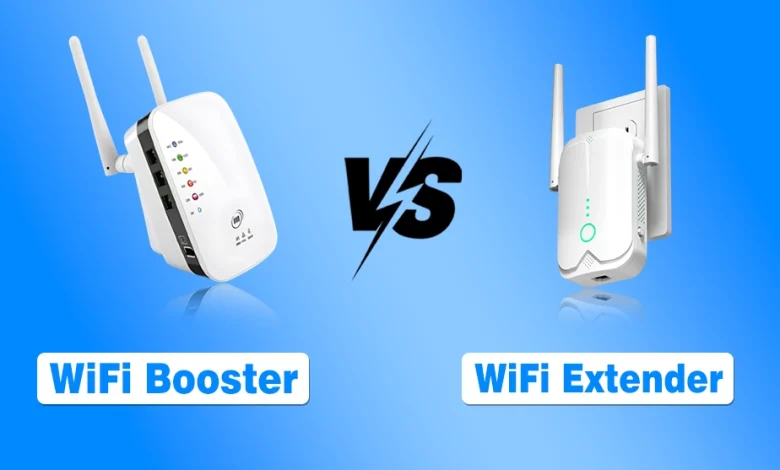
A WiFi booster repeats your existing wireless signal to cover small dead zones, while a WiFi extender creates a stronger secondary access point to deliver more stable coverage across larger areas. Both improve WiFi reach, but they are not interchangeable, and choosing the wrong one often leads to disappointment.
In 2026, modern homes face heavier WiFi loads from smart devices, streaming, and remote work, which makes coverage problems more noticeable than ever. Terms like booster, extender, repeater, and mesh are often used interchangeably, even though they solve connectivity issues in different ways.
This guide explains how WiFi boosters and extenders actually work, where each one performs best, and which option makes sense based on your home size, usage, and expectations, so you buy the right solution instead of wasting money.
Why Does the WiFi Coverage Problem Occur in Modern Homes?
Modern homes are filled with obstacles that WiFi signals struggle to cross. Thick concrete walls, metal furniture, multiple floors, and even neighboring networks all interfere with signal strength. Routers are also usually placed in corners instead of central locations. Add smart TVs, cameras, gaming consoles, and phones all competing for bandwidth, and suddenly your internet feels slow even with a fast package.
It is where WiFi boosters and extenders come into the picture. They are designed to stretch your existing signal, not magically increase your internet speed. Understanding this simple fact will already save you from unrealistic expectations.
What Is a WiFi Booster?
A WiFi booster is typically a device that helps amplify or rebroadcast your existing WiFi signal.
In most cases, it is either a repeater or an extender sold under a more appealing name. The goal is simple: capture the signal from your router and push it farther into weak areas of your home.
Boosters are popular because they are easy to install, affordable, and require minimal configuration. You plug them into a wall socket, connect them to your network, and they start relaying the signal.
However, they do not create a new, stronger signal. They only repeat what they receive. For Xfinity users, the Xfi Complete package often includes specialized hardware like Boost Pods to solve these exact range issues.
How WiFi Boosters Work in Real Life?
A booster listens to your router and then rebroadcasts the same signal. If the signal it receives is weak, the rebroadcasted signal will also be weak. It is why placement matters a lot. A booster should never be installed in a dead zone. It needs a stable connection to your router to be effective.
Common Use Cases for WiFi Boosters
Boosters work best in small homes or apartments where only one or two rooms suffer from weak coverage. They are also useful for casual browsing, social media, and light streaming. If your needs are basic, a booster can be a quick fix.
What Is a WiFi Extender?
A WiFi extender is a more defined category of device that extends your wireless coverage by creating a secondary access point.
Unlike boosters that simply repeat signals, extenders usually rebroadcast the signal using a separate network identity or smarter signal management. Extenders are designed to cover larger spaces and offer more control.
Many modern extenders support advanced standards, dual band connections, and better antennas.
How WiFi Extenders Improve Coverage?
Extenders connect to your router wirelessly or via Ethernet and then transmit WiFi into areas your router cannot reach. Because they manage traffic better than basic boosters, extenders often provide more stable performance, especially for video calls and streaming.
Common Use Cases for WiFi Extenders
If you live in a medium sized house, have multiple rooms, or deal with thick walls, an extender usually makes more sense. They are also ideal for work from home setups where reliability matters more than raw speed.
WiFi Booster vs WiFi Extender Key Differences Explained
It is the core comparison section. Before breaking it into specific points, I want to make one thing clear. Both devices aim to solve the same problem but they approach it differently.
The difference is not about speed promises but about stability, coverage efficiency, and scalability. Let us break it down clearly.
| Factor | WiFi Booster | WiFi Extender |
|---|---|---|
| Primary Purpose | Rebroadcasts an existing WiFi signal to slightly expand coverage | Extends network coverage by creating a more structured secondary access point |
| Technical Definition | Usually a repeater marketed under a simplified name | A defined networking device designed for controlled coverage expansion |
| Signal Handling | Repeats the signal exactly as received | Manages and optimizes signal before rebroadcasting |
| Performance Consistency | Can fluctuate depending on signal quality it receives | More stable and predictable performance across rooms |
| Coverage Area | Suitable for one or two weak zones | Covers larger areas and multiple rooms more effectively |
| Speed Impact | May reduce effective speed due to signal repetition | Better at maintaining usable speeds under load |
| Latency and Lag | Higher latency during gaming or video calls | Lower latency compared to boosters |
| Network Name Behavior | Often creates a separate network name | Usually supports seamless roaming with same SSID |
| Device Switching | Devices may disconnect and reconnect manually | Devices switch automatically as you move |
| Ease of Setup | Very easy plug and play installation | Slightly longer setup but still beginner friendly |
| Configuration Options | Minimal or none | Advanced settings available in most models |
| Compatibility with Modern Routers | Works but may not fully utilize newer standards | Designed to pair well with modern routers |
| Multi Device Handling | Struggles when many devices connect | Handles multiple devices more efficiently |
| Streaming Performance | Acceptable for standard video | More reliable for high quality streaming |
| Work From Home Suitability | Not ideal for meetings or remote work | Well suited for video calls and cloud work |
| Gaming Performance | Often inconsistent due to higher latency | More stable for online gaming |
| Placement Sensitivity | Highly sensitive to placement location | More forgiving with placement |
| Scalability | Limited and not ideal for expansion | Can be expanded with additional extenders |
| Long Term Reliability | Performance may degrade under heavy usage | Designed for sustained daily usage |
| Typical Price Range | Lower upfront cost | Slightly higher cost but better value |
| Value for Money | Good for quick fixes | Better return for long term usage |
| Best For | Small apartments and light usage | Medium to large homes and modern usage |
| Upgrade Path | Often replaced when needs grow | Can be part of a larger network setup |
Do WiFi Boosters or Extenders Increase Internet Speed?
It is one of the biggest misconceptions, so let us address it honestly before moving forward.
Neither boosters nor extenders increase your internet speed beyond what your service provider delivers. What they do improve is signal availability. If your device was previously stuck on one bar of WiFi, extending coverage can make the connection feel faster simply because the signal is stronger and more stable.
If you already have good coverage and still experience slow speeds, the issue lies with your internet plan, router quality, or network congestion.
When a WiFi Booster Makes Sense in 2026?
If you live in a small apartment, stream occasionally, and just need coverage in one extra room, a WiFi booster can be enough. It is also suitable for temporary setups such as rental homes or dorms where you do not want to invest heavily.
Boosters are also good if your budget is very limited and expectations are realistic.
When a WiFi Extender Is the Better Choice?
If you work from home, attend video meetings, play online games, or stream in high quality, an extender is the safer investment. It provides more stable performance and handles multiple devices better.
Homes with multiple floors or thick walls benefit significantly from extenders, especially when paired with modern routers.
WiFi Booster vs Extender vs Mesh Systems in 2026
Before making a final decision, we cannot ignore mesh WiFi systems. In this section, I have provided a short overview.
Mesh systems replace traditional routers and extenders with multiple coordinated nodes. They offer seamless coverage, better speeds, and automatic optimization. However, they cost more and require a full system setup.
If you are building a new home network from scratch, mesh WiFi may be worth considering. If you are fixing an existing setup, extenders are usually more practical.
Final Thoughts
So, which one should you buy in 2026 among WiFi booster vs extender? If you ask me, the answer depends entirely on your expectations and environment. WiFi boosters are simple, cheap, and useful for small fixes.
WiFi extenders are more reliable, scalable, and better suited for modern internet usage. Neither is magic, but when chosen correctly, both can dramatically improve your experience. If your WiFi struggles daily, do not ignore it.
A stable connection is no longer a luxury, it is a basic requirement for work, entertainment, and communication today.