You’ve just published a perfect blog post about your handcrafted artisan coffee beans. Your content is rich, engaging, and filled with valuable information. But when someone searches for “best organic coffee beans,” it is not on the SERP?
After 15+ years working in SEO and digital marketing, I’ve seen strategies evolve from simple keyword stuffing to today’s AI-driven search ecosystem. One thing that has quietly become essential, but is still underutilized by many websites, is schema markup.
Search engines are unable to draw the data meaning from raw text alone, which can lead to missing important details. Adding schema markup makes your content eligible for rich search results (rich snippets). These enhanced results can include images, ratings, event times, FAQs, and more, directly in Google’s search pages.
In this schema markup guide, I will explain what exactly it is, its types, practices and the way to implement it on your website for better search engine visibility.
What is Schema Markup?
Start creating Verdict in seconds, and convert more of your visitors into leads.
Schema markup (a form of structured data) is essentially a semantic vocabulary of tags or code you add to your HTML to improve how search engines read your content.
It uses the schema.org vocabulary – a collaborative project by Google, Bing, Yahoo, and Yandex – to establish a common “language” for describing entities on web pages.
For instance, you can mark a person’s name as an author of an article, a product’s price and availability, or a recipe’s ingredients and cooking time. Through labeling these elements, you help search engines “contextualize” your content and serve more relevant results to users.
Key Points About Schema Markup
✅ Semantic Vocabulary: Schema is not about visible page design; it’s about meaning. It defines types (like Article, Product, Event, LocalBusiness, etc.) and properties (like name, datePublished, price, ratingValue, etc.).
✅ Machine-Readable: Unlike normal text, schema is structured in JSON-LD (or other formats) that prevents misinterpretation.
✅ Not a Rank Factor: Schema itself is not a direct ranking signal. Google’s John Mueller has confirmed that structured data doesn’t directly improve rankings. Its power is in triggering rich features (like knowledge panels, carousels, stars) that can improve user engagement.
More importantly, schema enables rich snippets that make your listing stand out. Data from MOZ shows that rich results boost click-through rates (CTR) by 20–30% or more compared to plain listings.
Why Schema Markup Matters More in 2026
Start creating Verdict in seconds, and convert more of your visitors into leads.
The role of schema markup has expanded significantly in recent years. It’s no longer just about rich snippets; it’s about machine understanding.
While Google has confirmed that AI Overviews pull from high-quality content across the web, structured data plays a foundational role in helping the AI understand and contextualize page content.
Google has stated that structured data like schema markup is one of the signals it uses to:
- Determinant topical relevance and page context
- Identify accurate sources for facts or answers
- Surface key information in structured formats (e.g., pricing, authorship, FAQs)
In short, schema markup can increase the likelihood that your content is:
- Chosen as a trusted source for AI-generated summaries in Google AI Overviews, ChatGPT, & Perplexity etc.
- Interpreted correctly in relation to the user’s search intent.
- Highlighted in visually rich, AI-powered result formats.
As AI becomes more integrated into search, schema markup is no longer just about enabling rich snippets, it’s about your content remains visible, trustworthy, and machine-readable in the SERP landscape.
How Search Engines Use Structured Data?
Start creating Verdict in seconds, and convert more of your visitors into leads.
Search engines like Google use structured data to generate rich search features (sometimes called rich results).
Google’s Search Central documentation confirms:<br>
Google uses structured data to understand the content on the page and show that content in a richer appearance in search results, which is called a rich result.
In practice, this means Google can display your content as:
- Rich Snippets: Enhanced listings with images, ratings, prices, breadcrumbs, etc.
- Knowledge Panels: Information boxes for brands, people, events in the sidebar.
- Carousels and Lists: Results like recipe carousels or local business carousels.
- Special SERP Features: Q&A blocks, FAQ drops, Job search features, etc.
For Example:
✔️Product schema can produce a snippet with price and review stars.
✔️FAQPage markup can show your FAQ questions directly on Google.
✔️Corporate contact or social profile schema can influence the Knowledge Panel for your brand.
✔️Breadcrumb schema replaces a long URL with a hierarchy path in the snippet and make navigation clearer.
However, remember that schema doesn’t guarantee these enhancements. Google ultimately decides whether to show a rich result.
For instance, Google has restricted some features (like FAQs and HowTo) to authoritative sites recently. But properly implemented schema enables rich features, and is a critical step if you want them.
Common Types of Schema Markup
Start creating Verdict in seconds, and convert more of your visitors into leads.
There are hundreds of schema types on schema.org, but only some are widely used and supported by Google. The basic idea is to use the type that best matches your content. Common schema types include:
| Schema Type | Use Case | Example |
| Article | Blog posts, news articles, blog postings. Includes title, author, images, date, and description. | Rich result with headline and image. |
| Product | E-commerce product pages. Includes name, image, price, availability, brand, etc. | Displays price, availability, and reviews in SERPs. |
| LocalBusiness | Physical business or store (with LocalBusiness or subtype, like Restaurant, Dentist). Includes address, phone, hours. | Google shows hours, location, and actions (e.g. “Book Appointment”). |
| FAQPage | Pages of frequently asked questions (lists of Q&A). | Google may show a FAQ carousel with question-answer pairs. |
| Organization | Company or organization info. Includes logo, social profiles, contact info. | Can trigger a Knowledge Panel with logo and links. |
| Breadcrumb | Breadcrumb navigation links for pages. | SERP shows breadcrumb trail instead of URL. |
| Review | For individual reviews (product, movie, recipe, etc.). Includes rating, author. | Adds star rating and review count to snippet. |
| Event | Events like concerts, webinars. Includes name, date, location. | Shows event date and location in search results. |
| Service | Service based businesses like salons, repair shops. | Service schema markup shows service data and location details. |
| Recipe | Recipes. Includes ingredients, cook time, nutrition, etc. | Creates a recipe card or rich snippet with photo. |
Each type has its own schema vocabulary. I recommend adding only the schemas relevant to your content.
For example, a blog should use the Article or Blog Posting schema, whereas a local shop should use the Local Business schema markup.
If you run an e-commerce store, definitely use Product schema with each product. The Ahrefs guide even suggests basic recommendations: e‑commerce sites add Product and Breadcrumb schema; blogs add Article and Organization schema.
Here are the 4 commonly used schema markup examples:
1. Article Schema
Article schema (or its subtype NewsArticle or BlogPosting) is for news/blog pages. It signals to Google that the page is a written content piece. At minimum, include fields like headline, image, datePublished, author, and possibly publisher (organization logo).
This helps Google show better titles, images, and date info in snippets. For example, Google’s docs show an Article markup like:
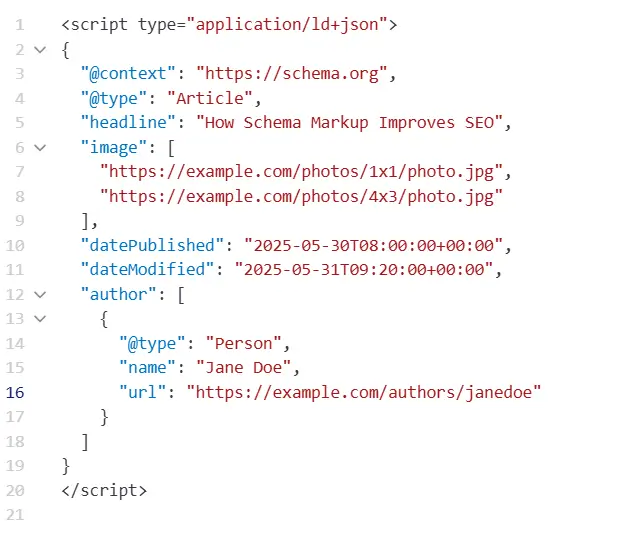
This JSON-LD snippet (placed in your page’s <head> or body) defines a NewsArticle with a headline, images, dates, and an author. Even just adding a few key fields can make your article eligible for a richer display.
2. Product Schema
For e-commerce Product pages, use Product schema. This can surface price, availability, review stars, and more. Google’s examples show that Product markup can include name, image, description, sku, brand, and an offers block with price and availability. For example:
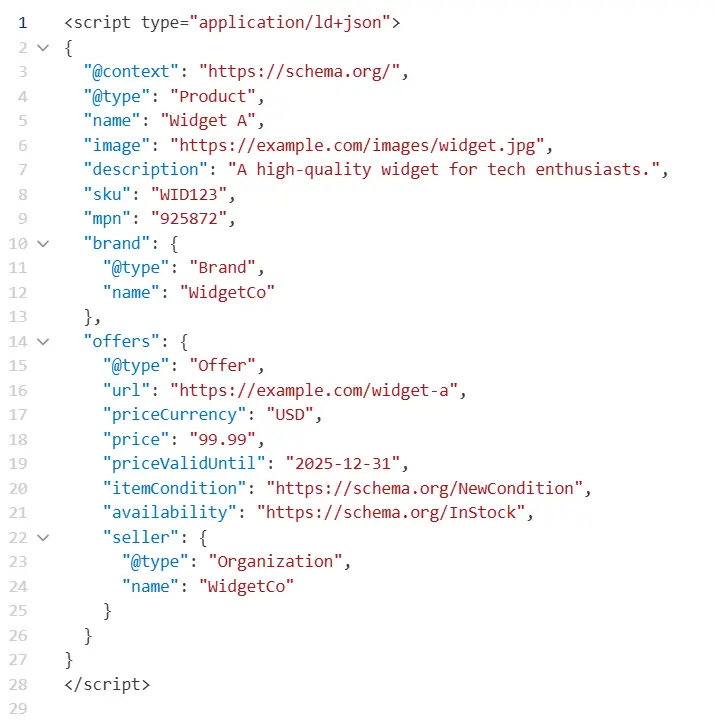
This markup tells Google the product’s name, image, and that it’s in stock at $99.99. As a result, searchers might see the price and “In stock” label right in the SERP.

3. LocalBusiness Schema
LocalBusiness (or a subtype like Restaurant, Dentist, etc.) schema is for physical businesses. Important fields include name, address, telephone, openingHours, and sameAs links. For example:
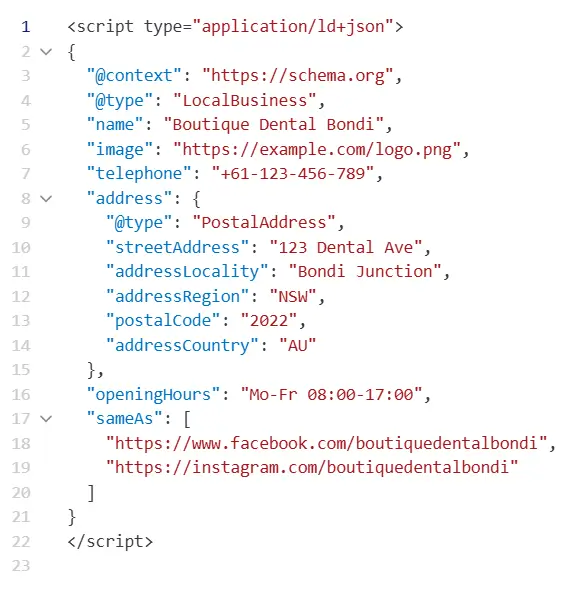
This tells search engines your business name, exact location, phone, hours, and social profiles. LocalBusiness schema enables Google to understand your business and show your business hours, different departments in your business, and more.
In practice, this can trigger a Knowledge Panel or rich listing with your hours and contact info. It also complements your Google Business Profile (GMB) – you should use both together for maximum effect.
4. FAQPage Schema
FAQ schema markup is used for pages with Frequently Asked Questions. You wrap each Q&A pair in Question and Answer objects within a mainEntity array. For example:
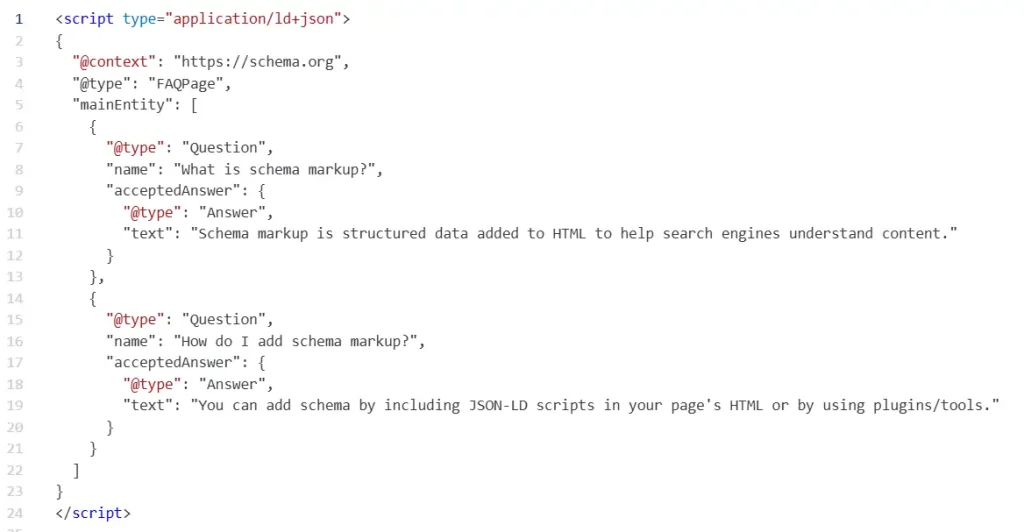
Each question’s name and answer’s text are shown in search results if Google chooses to display them. This can greatly increase visibility for Q&A content – people see your questions and answers right on the SERP.
<strong>Subject</strong>: ………………………………
📌 Note: Google has recently limited FAQ rich results to high-authority sites, but it’s still useful to implement for potential clicks.) As one SEO expert notes, schema is increasingly used in features like “questions” and “how-to” results, letting you “show up even more” in search.
What is the Recommended Format For Implementing Schema Markup?
There are three main ways to add schema to a page: JSON-LD, Microdata, and RDFa.
JSON-LD is Google’s preferred format. It’s simply a <script type="application/ld+json"> block you place in the HTML (usually in the <head> or right before </body>). JSON-LD is easier to manage because it’s separated from your content HTML.
Microdata and RDFa require embedding attributes (like itemprop) within your HTML tags, which is more error-prone.
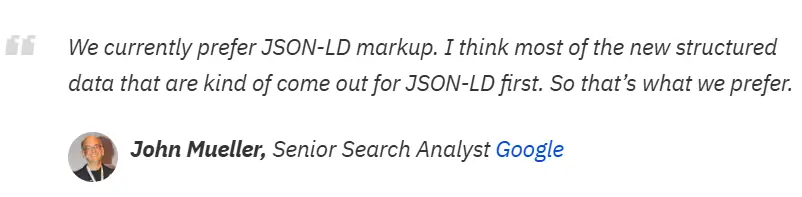
Most experts and Google engineers recommend JSON-LD. For example, Google explicitly states they prefer JSON-LD for new structured data, and Ahrefs quotes John Mueller: “We currently prefer JSON-LD markup”.
Using JSON-LD is “cleaner and faster to work with” – you can edit it without touching your HTML structure. As Umbraco’s guide puts it, RDFa/Microdata “require more effort… are more prone to errors.”
In summary: JSON-LD is recommended and easiest to manage. Generate the JSON with a tool or by coding it manually, then paste it into your page HTML. If everything is correct, search engines will pick it up on their next crawl.
How To Implement The Schema Markup?
Start creating Verdict in seconds, and convert more of your visitors into leads.
Below is how you can implement schema markup on your website.
1. Identify Content Types:
Start by deciding which schema types apply to your content. If you run a blog, you’ll likely use Article or FAQPage. E-commerce sites will use Product, Review, or Offer. Local businesses can use LocalBusiness or Organization.
2. Use a Schema Markup Generator:
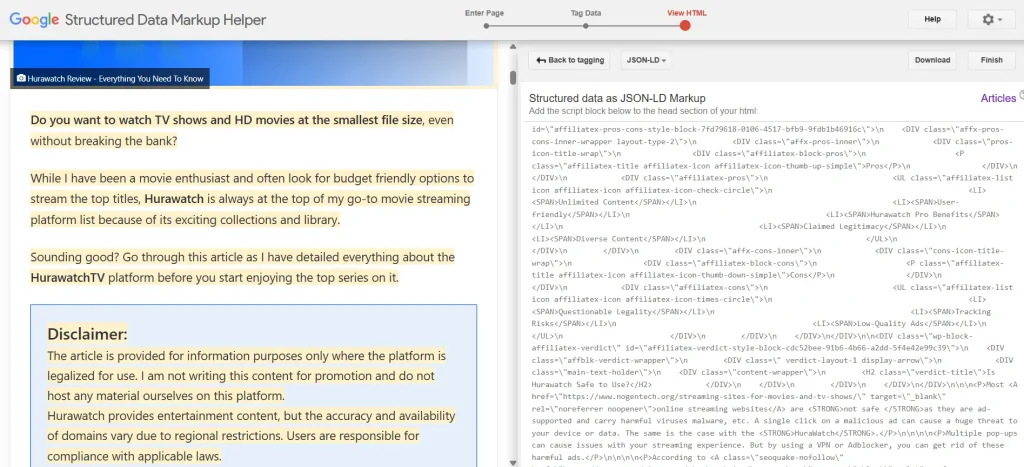
You can write JSON-LD by hand following schema.org documentation, or use tools to help. For beginners, schema generators (like Google Structured Data Markup Helper) can auto-create the code.
You simply select the type (Article, Product, etc.) and fill in your content fields. Even ChatGPT or other AI can draft JSON-LD for you if you provide the data.
3. Paste Schema into Your HTML:
Place the schema code in your HTML. With JSON-LD, you can insert it into the <head> section or before the closing </body> tag. If you’re using a CMS like WordPress, many SEO plugins let you insert schema without touching code.
4. Test Your Markup:
Use Google’s Rich Results Test or Schema Markup Validator to ensure your code is valid and eligible for rich results. These Schema Markup tools point out the errors and show how your content will appear in search.
5. Deploy the Markup.
Once you have validated the schema, add the JSON-LD <script> block to your page’s HTML. You can place it in the <head> or at the end of <body> – Google treats both the same.
Deployment of Schema Through CMS
If you use a CMS or website builder, check for built-in schema options. Many modern platforms (WordPress, Wix, Shopify, etc.) and SEO plugins (like Yoast SEO) can insert common schema types automatically.
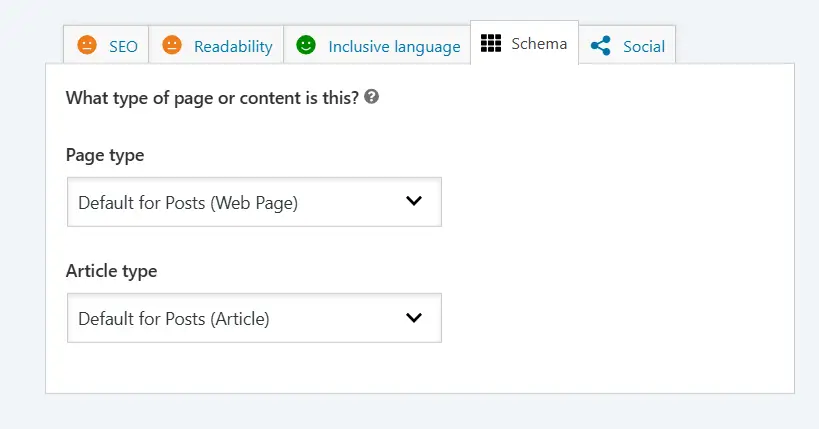
You can easily add schema to your post using the Schema tab in Yoast SEO. For detailed instructions on adding schema for different types of content, refer to the Yoast Schema Guide.
Best Practices for Schema Markup
Some verified practices for a smooth implementation of Schema Markup are listed below to make your journey to rich results easier.
- Use JSON-LD whenever possible, and keep your site’s code clean.
- Add markup only for content that’s visible. Don’t put schema for hidden content; Google requires the data be present on the page for users to see.
- Use correct value formats. For dates, use ISO format (
YYYY-MM-DDThh:mm:ss±hh:mm). For URLs, use absolute links. - Include
publisherorauthorinfo: For Articles, linking an author (as a Person or Organization with a URL) is recommended. - Monitor your data: Periodically check Google Search Console for errors. If you update content (like a new price), update the schema too.
- Use
@idlinking: For advanced use, use@idto co-reference entities (e.g., link aBrandobject across multiple schemas). This creates a unified entity graph for Google. - Stay up to date: Google occasionally updates which schema types it supports for rich results. For example, check Google’s Search Gallery for new or deprecated features.
- Progressive rollout: Start with simple, high-value schemas (Article, Product, LocalBusiness). Once confident, expand to other types like Events, FAQs, & HowTo schema, etc.
Schema Markup Is No Longer Optional for SEO Success
Start creating Verdict in seconds, and convert more of your visitors into leads.
Schema markup has evolved from a technical SEO feature into a core component of modern search optimization. Properly implemented schema not only boost your rankings, but it can unlock rich snippets that make your content more prominent and clickable.
It is like telling Google, “This is exactly what my page is about.” You speak Google’s language, improve your visibility in search results, AI summaries and potentially drive more traffic to your site.
For any webmaster or content creator looking to improve their SEO and stand out in SERPs, schema is one of the most critical modern techniques to master.
People Also Ask
Start creating Verdict in seconds, and convert more of your visitors into leads.
Schema markup is structured data added to a webpage to help search engines understand content better.
Yes, it is increasingly important for AI search visibility and enhanced search results.
JSON-LD is the most recommended format by Google.
Yes, by improving visibility and click-through rates, it can lead to increased traffic.
No, basic schema markup is relatively easy to implement, especially using JSON-LD format. Many CMS platforms and plugins can also automate the process.
Yes, schema markup can improve CTR by enabling rich snippets like FAQs, ratings, and product details that make your listing more attractive in search results.