- Short, focused videos (60–120 seconds) simplify complex ideas and help audiences “get it” within seconds.
- What once required multiple specialists and thousands of dollars can now be done in minutes using AI tools.
- Follow a simple structure: Hook → Solution → How it works → Proof → Call to action.
- From script generation to voiceovers, visuals, and branding—modern tools automate the entire workflow.
- AI allows you to create multiple versions for A/B testing without increasing production costs.
Ever watched a 60-second video and thought, “Wow, I totally get it now”? That’s the magic of a well-crafted explainer video.
Whether you’re launching a new product, simplifying a complex service, or just trying to grab attention online, explainer videos are one of the most powerful tools in your marketing arsenal.
In fact, Wyzowl’s 2025 Video Marketing Report reveals that 96% of people have watched an explainer video to learn about a product or service.
In this scroll-happy world, attention spans are shorter than ever, and you’ve got seconds to make an impression by making your videos sticky.
Today, you can create compelling explainer videos without expensive equipment or specialized skills, just smart tools and a clear strategy.
In this blog post, I’ll explain what an explainer video is and how to use AI to create an explainer video that engages your audience and elevates your brand.
What Is an Explainer Video and Why Does Your Business Need One?
An explainer video is a short (usually 60 to 120 seconds long) focused video that communicates what your business does, how your product works, or why your service solves a problem.
Studies consistently show that landing pages with explainer videos convert significantly better than those without. According to Insivia, viewers retain 95% of a message delivered through video compared to just 10% through text alone.
Whether you run a SaaS company, an e-commerce store, a healthcare brand, or a local business, an explainer video gives your audience clarity and confidence to take the next step.
The Old Way vs The AI Way
Traditional explainer video production involves hiring a scriptwriter, a voiceover artist, a motion designer, and a video editor. The process can cost anywhere from $1,000 to $10,000 and take several weeks to complete.
AI-powered tools have replaced this entire workflow. You can now go from a text prompt or a blog URL to a fully produced, publish-ready video in a matter of minutes.
No timeline editing. No stock footage hunting. No expensive freelancers. Just structured input and intelligent output.
How to Create an Explainer Video Using AI: Step by Step
Step 1: Define Your Video Goal
Before you open any tool, get clear on one thing: what do you want viewers to do after watching?
It is essential to begin the explainer video production process with a clear understanding of what the project aims to achieve.
Your goal could be to sign up for a free trial, book a demo, understand a product feature, or simply learn what your brand stands for. A focused goal shapes your script and your visuals.
Keep your message tight. The best explainer videos cover one problem and one solution.
Step 2: Write Your Script or Outline
AI tools work best when you give them a clear narrative structure. Use this simple framework:
- Hook: Open with the problem your audience faces
- Solution: Introduce your product or service as the answer
- How It Works: Walk through the key steps or features
- Proof: Add a result, metric, or customer outcome
- Call to Action: Tell viewers exactly what to do next
You do not need a perfect script. Even a bullet-point outline is enough for most AI video platforms to build a complete narrative around.
Step 3: Choose the Right AI Explainer Video Tool
Not all AI video tools are built the same. The best platforms handle everything end-to-end, from scene generation and motion graphics to voiceover and export formatting.
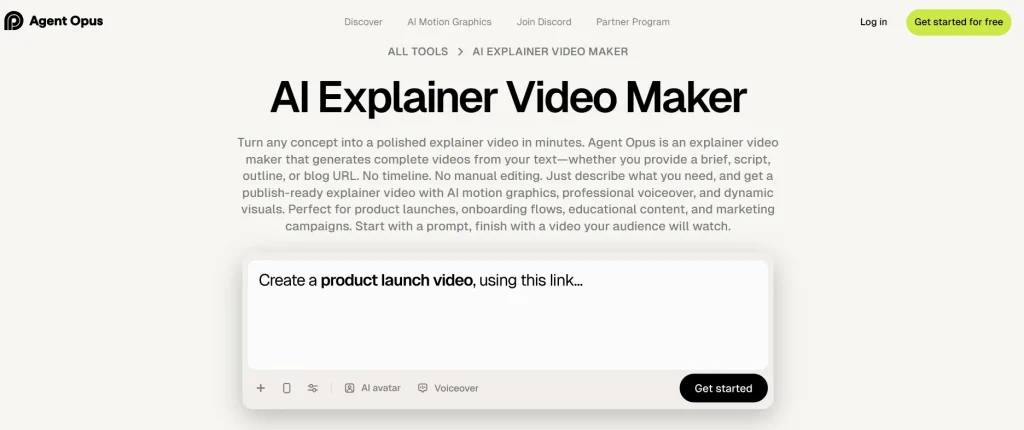
One of the most capable tools available right now is the explainer video maker from OpusClip. It uses an intelligent agent called Agent Opus that takes your script, prompt, or blog URL and transforms it into a fully produced explainer video complete with AI motion graphics, professional voiceover, and social-ready formatting.
You can upload your own brand assets like logos, product screenshots, and color palettes. The platform integrates them directly into the video so the final output matches your brand identity without any manual design work.
Step 4: Input Your Content and Customize
Once you have chosen your tool, paste in your script or outline. Agent Opus also accepts a blog post URL if you want to repurpose written content directly into video format.
From there, you can customize key elements such as:
- Voice: Clone your own voice by uploading a short 30-second sample or choose from a library of professional AI voices in multiple languages
- Avatar: Use an AI-generated presenter or upload your own footage for a personalized on-screen presence
- Visuals: Agent Opus automatically sources relevant real-world images, news, and web visuals that match your script’s meaning
- Music: Background tracks are selected and mixed automatically to match the tone and pacing of your content
Step 5: Review, Generate and Publish
Once you submit your request, Agent Opus generates a script for you to review before the video is produced. You have a window to edit or approve the script before generation continues, ensuring the final output matches your vision.
After generation, review the video for accuracy and flow. Agent Opus currently supports vertical 9:16 format, which is optimized for TikTok, Instagram Reels, and YouTube Shorts, making it ideal for social-first distribution. Additional aspect ratios, including 16:9 for YouTube and website embeds, are coming soon.
Download your finished video and schedule it through your preferred content management platform or publish directly to your social channels.
Tips to Make Your AI Explainer Video More Effective
- Keep it under 90 seconds. Audience attention drops sharply after the 90-second mark. Trim your script to the most essential points only.
- Lead with the problem, not your brand. Viewers connect with pain points before they connect with products. Hook them with empathy before introducing your solution.
- Use on-screen text to reinforce key points. Not everyone watches with the sound on. Kinetic text overlays ensure your message lands regardless of viewing conditions.
- Add a visible call to action. Tell viewers what to do, where to click, or what to type. A clear CTA at the end of your video can significantly improve your conversion rate.
- Test different versions. One of the biggest advantages of AI video tools is speed. You can produce multiple variations of your explainer video to A/B test different hooks, scripts, or visual styles without multiplying your production costs.
Use Cases: Who Benefits Most from AI Explainer Videos?
AI-generated explainer videos are useful across a wide range of industries and business types.
- Marketing Agencies use them to deliver high-volume video content for multiple clients without expanding their creative team.
- SaaS and Tech Companies use them to demo product features, onboard new users, and simplify technical concepts for non-technical audiences.
- E-commerce Brands use them for product pages, ad campaigns, and social media content that drives purchase decisions.
- Healthcare and Education Providers use them to explain complex procedures, treatment plans, or learning concepts in a patient-friendly and student-friendly format.
- Startups and Founders use them for pitch decks, investor presentations, and landing pages where clarity and first impressions matter most.
It’s Time to Create Your Explainer Video
Creating an explainer video for your business no longer requires a studio, a production team, or weeks of back-and-forth revisions.
With the right AI tool, a clear script, and a focused message, you can produce a publish-ready explainer video in minutes. Start with one video, measure the results, and build from there.
The businesses winning attention online are the ones showing up consistently with clear, engaging video content. AI makes that possible for everyone.