
Crazy Shooters is a browser-based first-person shooting (FPS) game from FreezeNova where every firefight tests your aim and movement. You can jump into Free For All (FFA) or Team Deathmatch (TDM), but getting kills is only part of the challenge.
Players can launch the game through CrazyShooters.com or find the game on platforms such as GamePix and start playing. Once the match begins, even a small mistake can cost you a fight. So, a better grasp of the controls and a few changes to your playstyle can help you stay alive longer and climb the scoreboard.
How to Access and Navigate Crazy Shooters
Jumping into the online FPS was straightforward, although the platform I used affected the experience. The game is available through several browser gaming sites, and each has its own loading process and ad experience.
Browser Access Across Devices
Crazy Shooters is also available on PCs, Macs, and Chromebooks through compatible browsers, and unlike typical apps, it doesn’t require any installation. School or workplace networks may still block access to gaming sites.
I initially thought the official CrazyShooters.com site would offer the best experience, and going straight to the game was convenient. However, loading took longer than expected, and display ads were plentiful.
I also loaded the same game on GamePix, and the experience was much smoother, and I met with fewer intrusive ads. However, performance and ad frequency can vary.
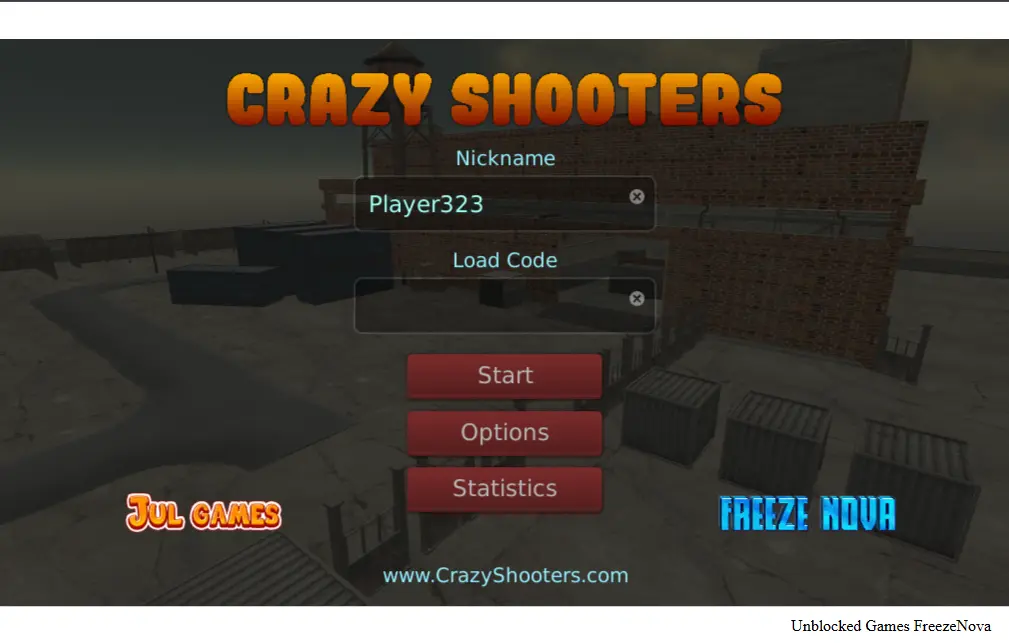
Main Menu Setup and Load Code
When the landing screen loads, you will see a few core fields before starting:
- Nickname: Enter your desired in-game username.
- Load Code: If you previously saved profile progress or game stats from FreezeNova servers, paste your unique code here to restore it. New players can leave this field blank.
- Options and Statistics: Adjust screen brightness, mouse sensitivity, or view lifetime performance stats.
Crazy Shooters Controls and Basics
The first step toward winning match firefights is getting comfortable with the movement layout and camera sensitivity. When you understand every key binding, you can react quickly during close-quarters combat.
Default Keyboard and Mouse Layout
| Action | Keyboard or Mouse Binding |
| Character Movement | W, A, S, D Keys or Simple Arrow Keys |
| Aim and Fire | Mouse Movement and Left Click |
| Scope or Iron Sights | Right Mouse Button |
| Jump | Spacebar |
| Crouch | C Key or Left Ctrl (for full crouch) |
| Reload Weapon | R Key |
| Switch Weapons | Number Keys 1 through 9 or Mouse Wheel |
| In-Game Chat | T to begin and Enter Key to send |
| Pause Menu or Scores | Tab Key or P Key |
How to Join and Host Server Lobbies in Crazy Shooters
Clicking Start on the main menu opens the global server list, where you can easily find a match or create your own arena environment.
- Joining Public Rooms: Browse the active server list and pick an open lobby to join. You can also click Quick Start to jump straight into action.
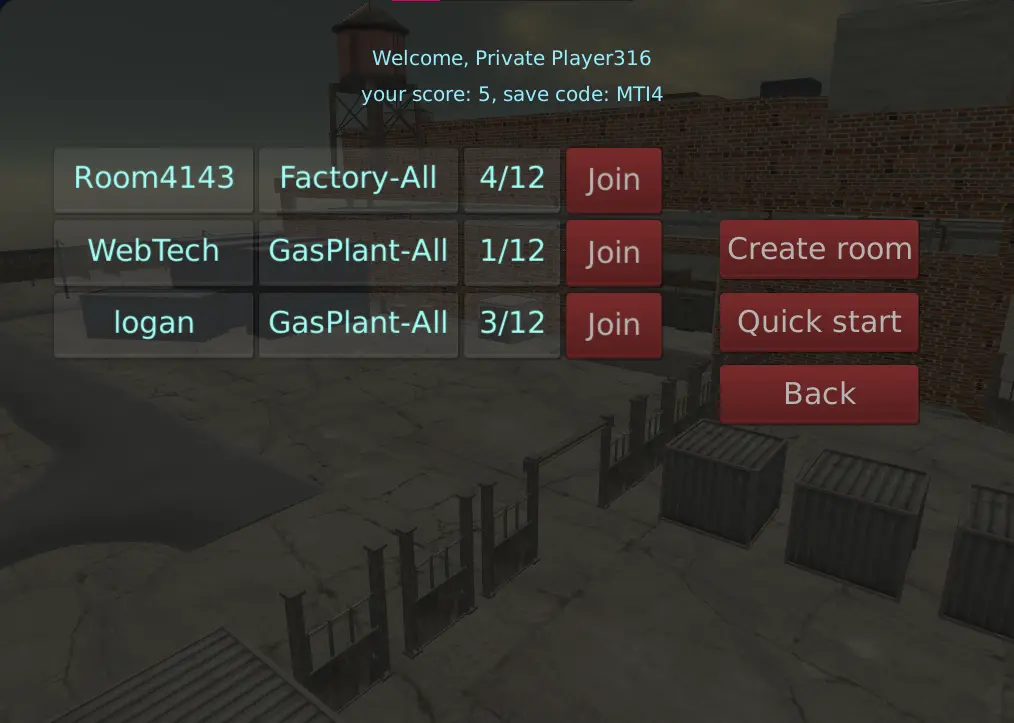
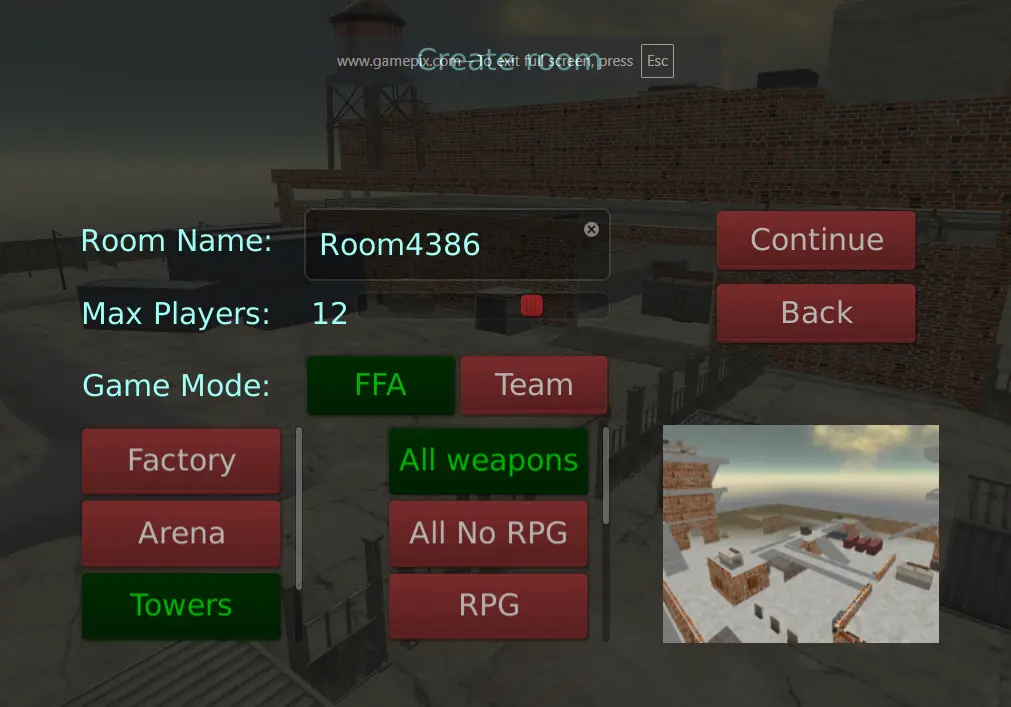
- Hosting Custom Matches: Click Create Room to choose your preferred map layout, toggle between Free For All or Team Deathmatch, set player caps, weapon choices, and hit Continue and then Join.
Some Combat Strategies to Get Better at Crazy Shooters
Once I entered a match, it became clear that quick reactions alone were not enough. Weapon choice, movement, and knowing when to take cover all made a difference in how long I stayed alive and how many fights I could win.
Different Weapon Choices to Go For
In Crazy Shooters, you have access to a full arsenal and can switch between the weapons using number keys 1 through 9. Selecting the right weapon for the map layout is important in winning a match:
- Assault Rifles (Best All-Rounder): Suitable for medium-range fights. Fire in bursts of 3 to 4 rounds instead of holding the trigger to keep recoil under control.
- Shotgun (Close-Quarters Dominance): Good choice for tight corridors and doorways. A well-aimed shot at close range can eliminate an enemy instantly.
- RPG / Rocket Launcher (Group Elimination): Useful for hitting groups of enemies or clearing sniper nests. Switch back to an assault rifle after firing because reloading the RPG leaves you defenceless.
- Sniper Rifle (Long-Range Sightlines): Best for shooting from high platforms with a clear view of the map. Crouch before firing to improve accuracy.
Movement and Survival Tactics
- Master the Jump-Strafe: Avoid standing still while shooting. Move left and right using the A and D keys, and jump occasionally to make it harder for enemies to aim at your head.
- Use Right-Click Aiming for Distance: Hip-firing works well at close range, but use your scope or iron sights by pressing the right mouse button when targeting enemies across open areas.
- Minimize Your Hitbox: Use crates, low walls, and concrete barriers for cover. Press C or left Ctrl to crouch, making yourself harder to hit while returning fire.
Real Gameplay Quirks and Known Glitches
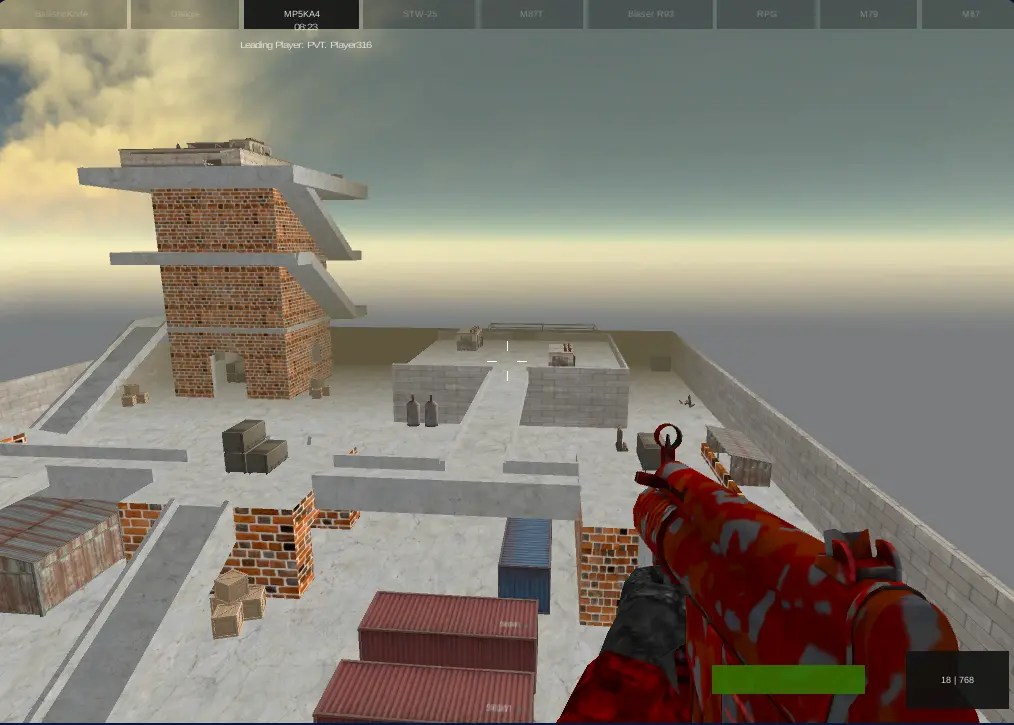
I ended up playing four or five matches in a row because the fast-paced action kept pulling me back in, especially because of the multiplayer and team features. However, after a few rounds, I noticed some issues that could use improvement, along with a few glitches that felt out of place.
Limited Maps and No On-Screen Radar
The number of arenas feels limited, and I started seeing the same layouts again after a few matches. There is also no mini-map or radar to help locate opponents, so finding enemies depends on what appears in front of you and where the gunfire comes from.
A wider map selection and a simple radar would make matches feel less repetitive and help players understand what is happening around them.
Physics and Flying Glitches
I also came across some odd ragdoll behaviour in multiplayer. After a player was eliminated, their character model would occasionally spin or fly across the screen in an unexpected way.
It was funny the first time, but these glitches made the game feel less polished. And other players were noticing it too. Hope FreezeNova fixes it.
No Simultaneous Jump-Running
Movement has another limitation: the game does not seem to allow running and jumping at the same time. That makes it harder to use bunny-hopping or similar movement techniques during fights.
More fluid movement could’ve definitely helped me dodge incoming fire, particularly in mid-range encounters.
How It Compares With Crazy Shooters 2
After spending time with the original Crazy Shooters, switching to Crazy Shooters 2 should feel familiar.
FreezeNova has kept the same controls, weapon lineup, and match layout, so there is little new to learn. The main reason to give the sequel a try is its wider map selection, with 11 arenas, including Factory, Freight Port, and Gladiator Arena.
If the original starts to feel repetitive after several rounds, the extra maps offer a good reason to give Crazy Shooters 2 a go.