We have all been there. You are scrolling through your phone for a movie not available on your usual apps when you find an unofficial streaming site. While it seems like a win, that nagging voice in your head wonders: Can this app see my private files?
The direct answer is that while modern phones use sandboxing to protect you, these sites can access your data if you grant storage permissions or if they exploit browser vulnerabilities.
In this guide, I have mentioned the key tips you can follow to block third-party streaming sites and apps from accessing your storage files.
Can Unofficial Streaming Apps and Platforms See Your Private Files?
The immediate answer is no, not by default.
However, the more comprehensive and concerning answer is yes. They absolutely can see your private files in storage, especially if you grant them permission or use vulnerable software.
How Third-Party Streaming Sites Access Your Storage Files?
In the under section, I want you to understand how modern mobile operating systems usually protect you, and then how those protections can be bypassed or actively circumvented by shady applications.
1. By Breaking Your Phone’s Built-in Bodyguard: The Sandbox
Think of your phone’s operating system, whether it is Android or iOS, as a very strict security guard. Every app you install is put into its own sandbox. The app can do its normal functioning without any errors.
It is the reason why a simple web browser cannot automatically access your camera roll or your contact list. Streaming videos normally happen within the app’s sandbox, using temporary memory (RAM) and a small, isolated cache area that the system controls.
While the sandbox is powerful, it is not unbreakable. The biggest weakness in this system is you, the user, granting permissions. Unofficial streaming apps or websites know this, and they are incredibly clever at tricking you into giving them the keys to your entire device.
They ask for storage access under seemingly innocent pretenses. This is not about your photos directly, but about gaining entry to where your photos live.
2. Injecting The Trojan Horse: Why They Ask for Storage Access
Unofficial streaming mirror websites and apps often ask for storage access. These apps will often present what sounds like a perfectly reasonable request. I have seen messages like these countless times:
- “Allow access to files and media to download movies for offline viewing.”
- “Grant storage permission for smoother playback and buffering.”
- “We need storage access to update the player to the latest version.”
These sound helpful, don’t they? They are designed to. They want you to believe that this access is for your benefit, to enhance your viewing experience.
When you tap “Allow” for storage access, particularly on an Android device, you are often granting the app broad permissions that go far beyond what is needed for simple streaming. You are telling your phone’s security guard, “It is okay, let this app roam free.”
This means the app can now:
- Scan Your Internal Storage: It can look through your photo albums, your downloaded files, your documents folder, and potentially even other app data. It is not necessarily “stealing” everything, but it can see what is there.
- Access Metadata: Your photos contain more than just images; they have metadata like GPS locations (where the photo was taken), timestamps, and device information. With storage access, the app can read this.
- Identify Sensitive Files: While it might not upload your entire photo library, it can search for specific types of files, like PDFs, spreadsheets, or even text files you might have saved with personal notes.
- Inject Malicious Code: In extreme cases, if the app is designed to be highly malicious, it could even modify or encrypt existing files on your device.
So, while they might not want your vacation photos, they might be looking for something else, or simply collecting data about what kind of files you store, which is still a massive privacy invasion.
3. Beyond Files: The Other Data Leak Dangers
It is important to remember that seeing your files is just one way your data can be compromised. Unofficial streaming sites and apps have other avenues for data leaks that do not even require direct storage access.
a) Cookies and Session Hijacking
Even without touching your files, a malicious streaming website can try to steal your browser’s “cookies.”
Cookies are small pieces of data that websites store on your device to remember you, keep you logged in, or personalize your experience. If an attacker gets hold of your cookies for another site (like your banking website or social media), they can potentially “hijack” your session.
Consequently, they log in as you without needing your password. That’s why it is important to clear cookies from your browser on a regular basis.
b) Browser Fingerprinting and Tracking
Many unofficial sites employ advanced tracking scripts that build a “fingerprint” of your device.
It involves collecting information about your browser version, operating system, screen resolution, installed fonts, and more. This fingerprint can uniquely identify you across different websites, even if you clear your cookies.
It allows them to build a profile of your online activities. To avoid such harmful circumstances, you have to follow safety measures for a secure browsing experience.
c) Notification Spam and Malware Downloads
Granting “notification access” to a sketchy site can lead to an endless barrage of intrusive ads, often disguised as system warnings.
In the worst cases, these notifications can even trick you into downloading outright malware or adware by posing as urgent updates or security alerts.
10 Essential Tips to Block Data Leaks and Protect Your Privacy
Now that you understand the risks, let us focus on prevention. I have put together 10 actionable tips that you can implement right away to secure your mobile device from unofficial streaming apps and sites getting access to your files, photos, and documents stored in your device’s storage.
1. Avoid Unofficial Apps and Sideloading
This is the golden rule. The safest streaming apps are those downloaded directly from your device’s official app store (Google Play Store for Android, Apple App Store for iOS).
These stores have review processes that, while not perfect, significantly reduce the risk of malware and excessive permission requests.
If an app asks you to “sideload” it (install an APK directly on Android, or use a developer profile on iOS), it bypasses these security checks entirely. If you must use a third-party app, do so with extreme caution.
2. Never Grant “Files and Media” or “Storage” Permissions
When an unofficial streaming app requests access to “Files and Media” or “Storage,” deny it.
Smooth streaming process uses temporary RAM for playback and its own sandboxed cache, which does not require broad access to your personal storage. If the app stops working after you deny this permission, it is a massive red flag, and I recommend uninstalling it immediately.
If you want to know which streaming option is best for you, check my complete guide on How to Evaluate Safety and Privacy of Streaming Apps and Websites.
3. Use a Dedicated “Burner” Browser for Streaming
I strongly recommend using a separate, privacy-focused browser solely for accessing unofficial streaming websites.
Browsers like Brave, DuckDuckGo, or Firefox Focus are excellent choices because they often have built-in ad blockers, tracker blockers, and features that automatically clear session data and cookies when you close them.
This keeps any potentially leaked session information isolated from your main browser, which you use for banking and personal accounts.
4. Clear Site Data and Cache Regularly
Do not just clear your browsing history; that is like cleaning the cover of a book. You need to clear the actual “site data” and “cache.”
It removes those potentially compromised cookies and temporary files that malicious sites might use for session hijacking or tracking. I recommend doing this after every unofficial streaming session.
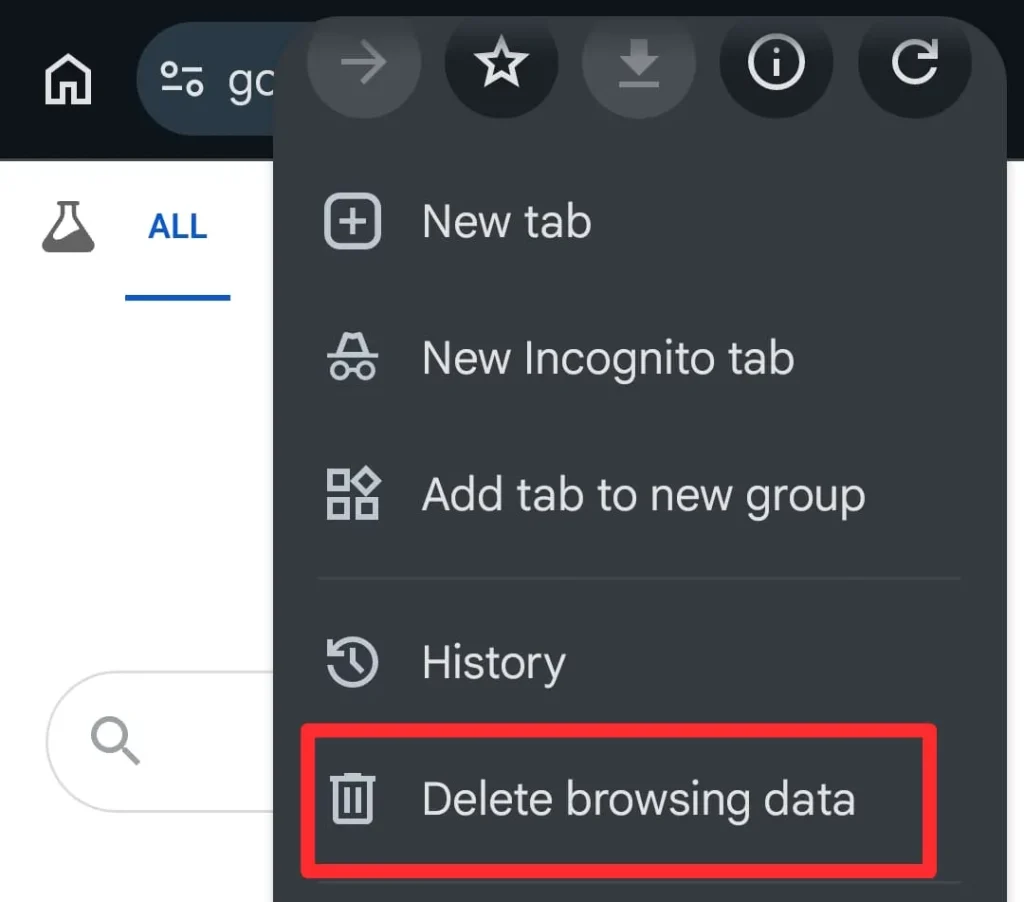
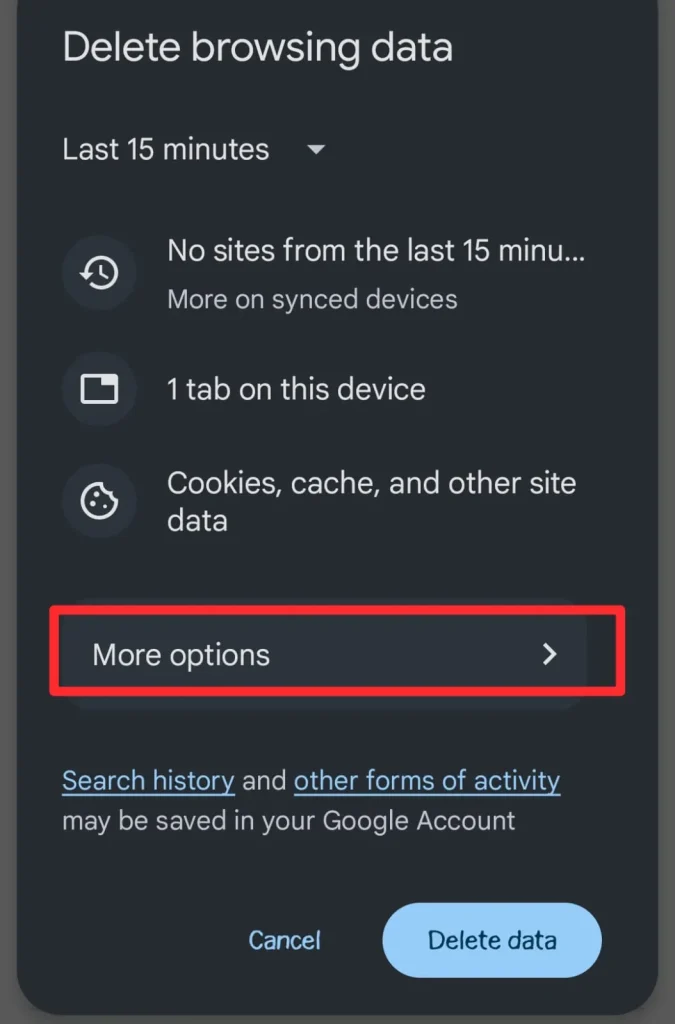
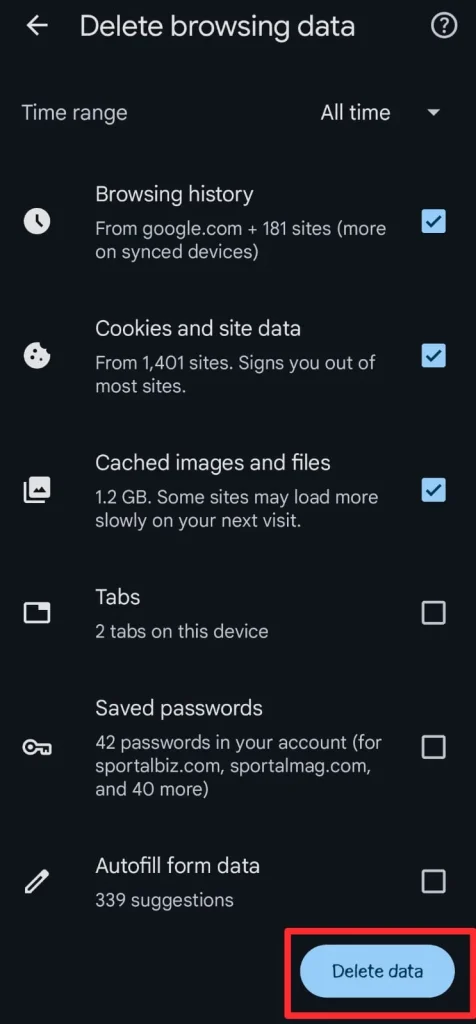
To clear site data and caches on Chrome, follow these steps:
- Open Chrome.
- Click three-dots on the top-right corner.
- Choose Delete browsing data.
- Go to More options.
- Select browsing history, Cookies and site data, Cached images and files, and then tap the Delete data button.
5. Deny Notification Permissions Immediately
When an unofficial streaming site asks to send you notifications, always click “Block” or “Don’t Allow.”
Granting this permission opens the door to relentless spam, deceptive ads, and potentially malicious push notifications that can trick you into downloading unwanted software.
6. Keep Your Device Software and Browser Updated
This might sound obvious, but it is crucial.
Software updates often include security patches that fix vulnerabilities (like “zero day” exploits) that malicious websites or apps could use to bypass your phone’s sandbox. Running outdated software is like leaving your front door unlocked.
7. Use a Reputable VPN
A Virtual Private Network (VPN) encrypts your internet connection and masks your IP address.
While a VPN does not directly prevent a streaming app from asking for storage access, it adds a crucial layer of anonymity and security. It makes it harder for malicious sites to link your activity back to your actual location or identity, especially if they are trying to collect data for targeted attacks.
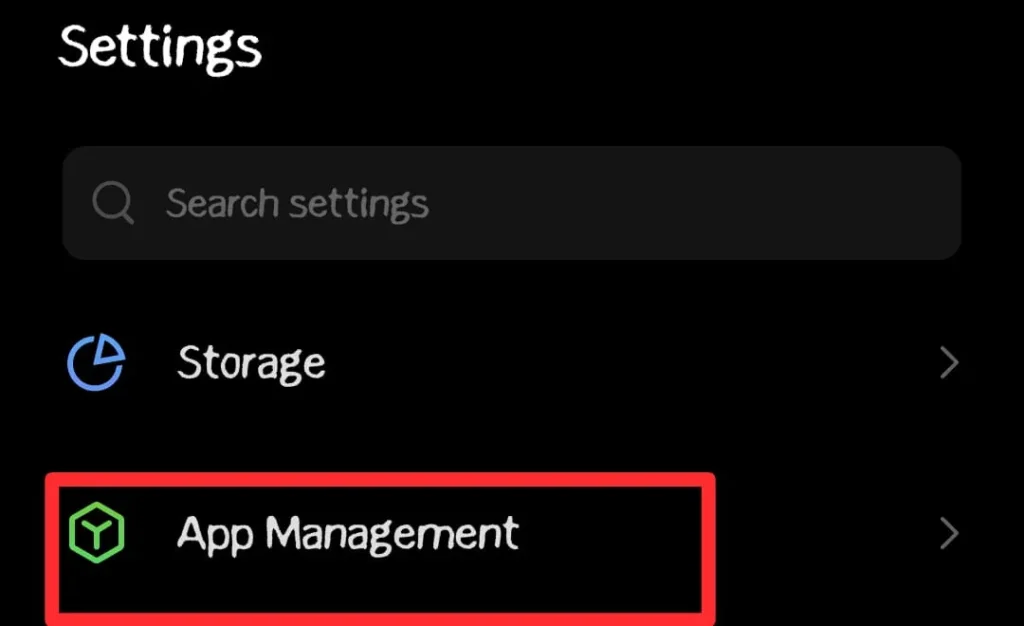
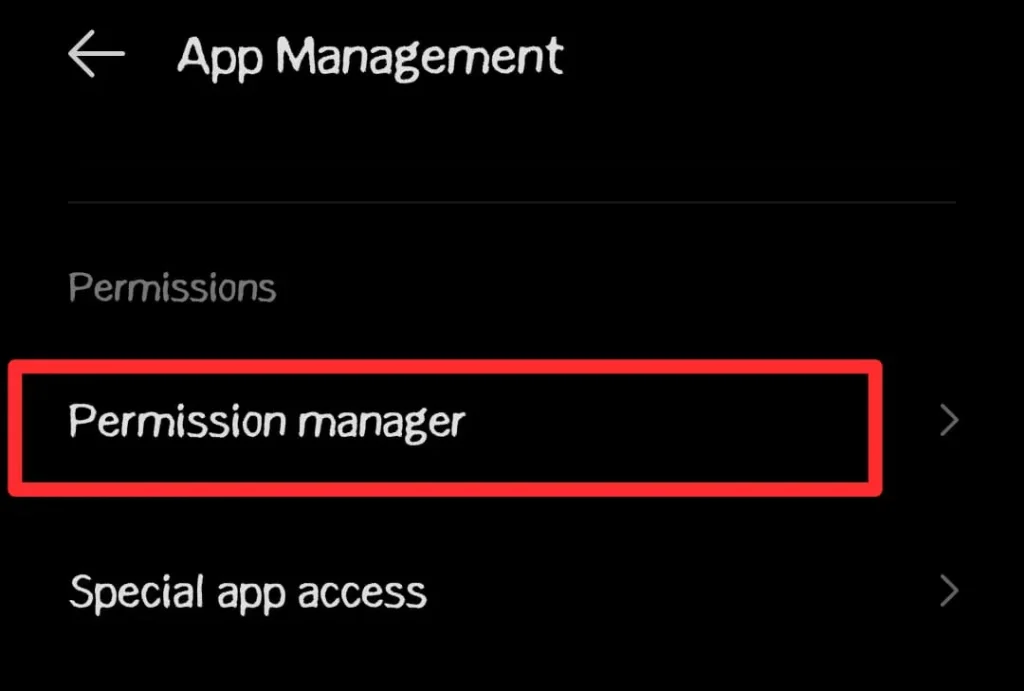
8. Review App Permissions Periodically
Even if you are careful initially, it is a good habit to review the permissions of all your installed apps regularly.
- Open your phone’s settings
- Go to App Management.
- Choose Permission Manager.
- Check the apps that can access your files.
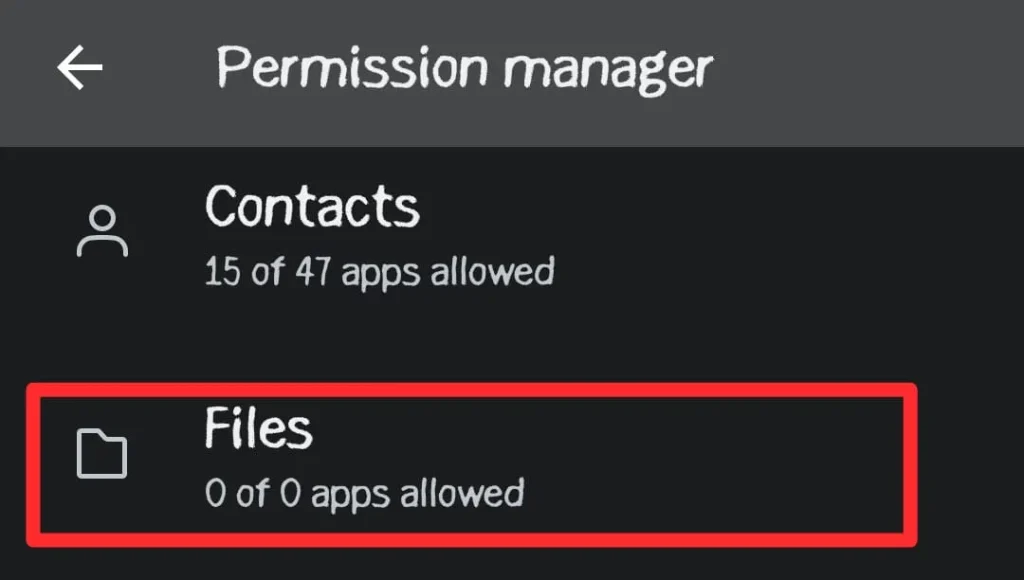
If an app you rarely use has access to your camera, microphone, or storage, revoke that access.
9. Be Wary of Pop-Ups and Player Updates
Unofficial streaming sites are infamous for aggressive pop-up ads and fake “player update” notifications.
While streaming mirrors change domains occasionally, these player update pop-ups are not always about them. These are often designed to scare you into clicking something that installs malware or grants unnecessary permissions.
You should always close these pop-ups cautiously, and never download a “player update” from an unofficial source.
10. Consider a Secondary Device for Risky Activities
If you frequently engage in activities that you suspect might be risky, such as using numerous unofficial streaming apps or testing unverified software, consider using a secondary phone or tablet that does not contain any of your sensitive personal data.
It creates an isolated environment, protecting your primary device from potential compromise. In this way, you can limit third-party streaming apps from tracking you.
Final Thoughts
It is clear that the world of unofficial streaming comes with hidden dangers, especially when it comes to your private files and data. But with the right knowledge and habits, you do not have to live in fear.
When you understand how these threats operate and implement these 10 practical tips, you can empower yourself to enjoy entertainment without sacrificing your digital privacy. Remember, your mobile device holds your entire life, and it is worth being its most vigilant protector.
I hope this guide helps you secure your digital space. Stay safe out there!