Sharing large files is a daily task for businesses and freelancers, but relying solely on WeTransfer can slow down your workflow. In 2025, teams need faster, more secure, and more professional ways to deliver client work, media files, and project assets without delays.
This is when reliable, secure, and high-speed file transferring tools come into play. These tools are part of your brand and productivity because of tighter deadlines and higher client expectations; they are no longer optional, but a must-have for competitive survival.
Fortunately, new platforms now offer larger storage, stronger encryption, custom branding, and smoother collaboration built for modern work. Thereby, I’ve come up with the top five file-sharing tools that are classified as the best alternative to WeTransfer in 2025.
What is WeTransfer?
WeTransfer is a cloud-based file transfer service developed by the Dutch company WeTransfer B.V., known for its simple platform for sending large files online without a complex setup.
Launched in 2009 in Amsterdam, it has become a widely used tool for creative professionals, freelancers, marketing teams, agencies, and businesses that need to move big digital assets quickly. The platform allows users to upload files and share them through a download link or email transfer.
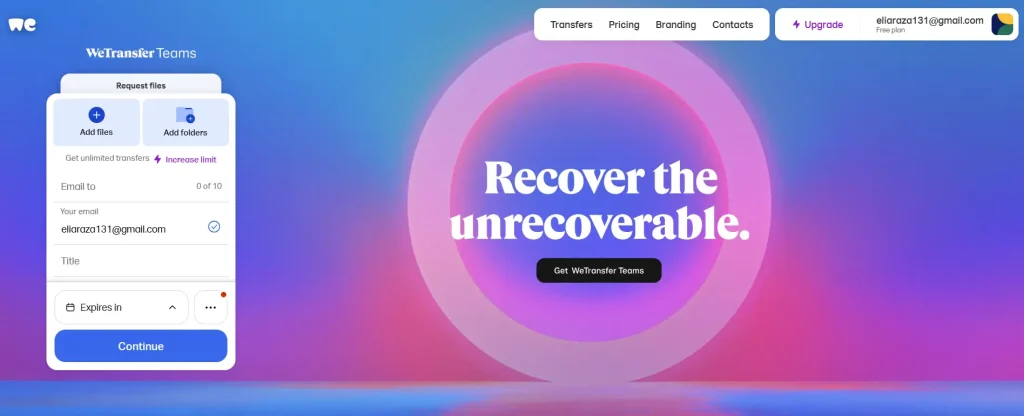
The Complete WeTransfer Feature Set
- Increased file size limits
- Password protection
- Custom branding
- Longer expiration times
- Cloud storage and file management
WeTransfer is also part of a wider ecosystem that includes:
- WeTransfer Collect (file organization app)
- WeTransfer Paper (creative sketching app)
- WeTransfer Paste (collaboration and presentation tool)
Looking for WeTransfer Alternatives? Start With These
Sometimes, it’s hard to manage multiple file shares on WeTransfer because of the limited free space, so you’ve to choose a second option. While older platforms like Files Over Miles offered fast and secure transfers, they are no longer available.
Thereby, I’ve come up with a list of modern tools like WeTransfer that will make your process of sharing files easier than ever:
1. Google Drive – Your files, Anywhere, Anytime.
Google Drive is one of the most popular cloud storage and file-sharing platforms in the world. Trusted by freelancers, businesses, and creative teams, it allows users to store, access, and share large files from anywhere, on any device.
With a seamless integration into the Google Workspace ecosystem, including Docs, Sheets, Slides, and Gmail, Google Drive makes collaboration effortless.
- Offline Use: Google Drive also lets you access files during offline activity.
- Third-Party Apps: You can also integrate third-party apps with this platform.
- Enhanced Security: Above all, Google Drive keeps your data safe for a longer period.
2. Sync – Secure Cloud Storage You Can Trust.
Sync is a privacy-focused cloud storage and file-sharing platform designed for businesses, freelancers, and creative professionals who prioritize security and control over their data. Unlike traditional cloud services, Sync offers end-to-end encryption, ensuring that only you and your collaborators can access your files.
Features like real-time folder syncing, link sharing with permissions, and remote file management make it an ideal choice for teams handling sensitive client data.
- Automatic Backup: This tool automatically backs up the data for an extended time.
- Activity Tracking: You can easily identify which user has opened the files.
- Drag & Drop Upload: You can upload the file by dragging it directly instead of searching the whole device.
3. Box – Collaborate Smarter, Share Faster.
Box is a cloud-based file-sharing and collaboration platform designed for businesses, teams, and freelancers who need more than just simple file transfers. Unlike basic tools, Box combines secure storage, file versioning, and real-time collaboration in one platform.
These features make it ideal for project management, client work, and creative teams.
- Admin Console: It helps you manage the staff activities inside this software.
- Data Privacy: Enhanced encryption status won’t let anyone steal your data.
- Easy Sharing: A single button press can generate shareable links.

4. Hightail – Send Big Files, Move Your Projects Forward.
Hightail is a cloud-based file-sharing and collaboration platform designed for creative professionals, freelancers, and businesses who need to move large files efficiently. Formerly known as YouSendIt, Hightail has evolved beyond simple file transfers to include features for project collaboration, feedback, and approvals.
With Hightail, users can send files of virtually any size, track when recipients view downloads, and collect comments directly on documents.
- Project Management: You can assign tasks to your team members with the help of built-in management tools.
- Alerts: You will get notifications and alert messages whenever a new file is uploaded.
- Access Controls: You can manage which users will access the files.

5. Dropbox – Simplifying File Sharing for Everyone.
Dropbox is one of the most popular cloud-based file storage and sharing platforms, trusted by freelancers, businesses, and creative teams worldwide. Founded in 2007 by Drew Houston and Arash Ferdowsi, Dropbox revolutionized how people store and collaborate on files, making large file transfers seamless and secure.
- Productivity Tools: This cloud storage comes with pre-installed productivity tools for efficient working.
- Customized Access: You can customize the permission to allow only a few members to access the files.
- Store All Files: Unlike the other tools, you can upload all kinds of multimedia and other files to Dropbox.

Final Talk on Websites Like WeTransfer
Whether you’re a freelancer, creative professional, or business team, sending large files efficiently is crucial in 2025. Each of these alternatives offers unique features to meet different needs: from robust security and collaboration tools to fast, user-friendly file sharing.
While Google Drive and Dropbox excel in versatility and integration, Sync emphasizes privacy, Box focuses on enterprise collaboration, and Hightail streamlines creative workflows. Choosing the right tool depends on your workflow, file size needs, and security priorities.
What People Also Search for WeTransfer Alternative
Can I share large files securely?
Yes. All these platforms provide secure cloud storage with encryption, access controls, and password-protected links.
Which alternative is best for businesses?
Box and Dropbox are designed for enterprise-level collaboration, team management, and integrations with business tools like Slack, Microsoft Office, and Zoom.
Can freelancers benefit from these tools?
Absolutely. Freelancers can use them to send large client files, maintain project organization, and share work professionally without worrying about size limits.
How do these platforms compare to WeTransfer?
Unlike WeTransfer, these alternatives often offer long-term storage, real-time collaboration, file versioning, and stronger security, which make them suitable for both personal and professional workflows.