My first introduction to Moz wasn’t through the platform itself, but through Domain Authority.
A client handed me a spreadsheet of backlinks with DA scores and asked which links were worth keeping. That conversation led me to create my first Moz account and explore the platform for myself.
Choosing the right SEO tool isn’t just about features; it’s about finding one that matches your workflow and budget.
Since then, I’ve used Moz alongside Ahrefs, Semrush, and other SEO tools across dozens of projects, giving me a clear understanding of where each platform stands.
Next, I’ll cover:
- Moz’s key SEO features and how they work.
- Domain Authority, Spam Score, and other Moz metrics.
- Moz Pro pricing and whether the plans offer good value.
- How Moz compares with Ahrefs and Semrush.
- Who should use Moz and the best alternatives to consider.
What is MOZ?
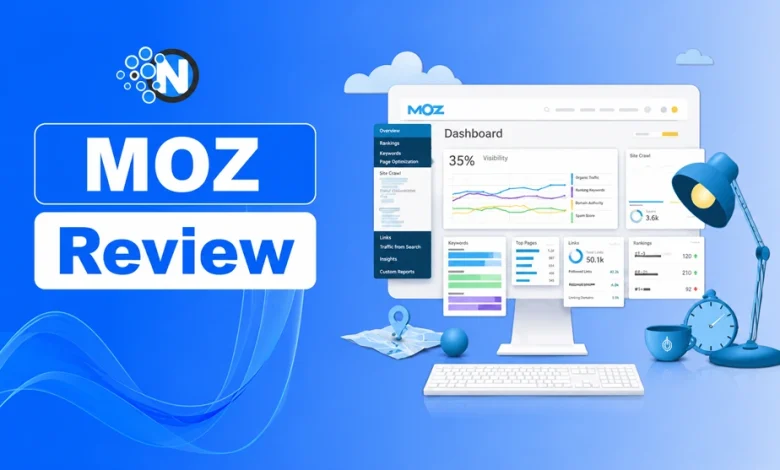
Moz is an all-in-one SEO platform that helps businesses improve search visibility through keyword research, backlink analysis, rank tracking, site audits, and local SEO tools.
In SEO, Moz works as a research and optimization tool that helps marketers understand search performance, identify ranking opportunities, analyze competitors, and improve website visibility.
Key Moz features include:
- Keyword research: Discover search terms, analyze difficulty, and find ranking opportunities.
- Backlink analysis: Review link profiles and identify potential link-building opportunities.
- Rank tracking: Monitor keyword positions and visibility changes.
- Site audits: Find technical SEO issues affecting website performance.
- Local SEO tools: Manage business listings and improve local search visibility.
Founded in 2004 by Rand Fishkin and Gillian Muessig as SEOmoz, Moz started as an SEO community before becoming a software platform. It rebranded as Moz in 2013 and expanded its focus on SEO tools and education.
Moz is known for its simple interface and clear recommendations, making SEO data easier to understand for marketers, agencies, and businesses.
Moz does not directly improve Google rankings. Instead, it provides insights that help users fix issues, track progress, and make better SEO decisions.
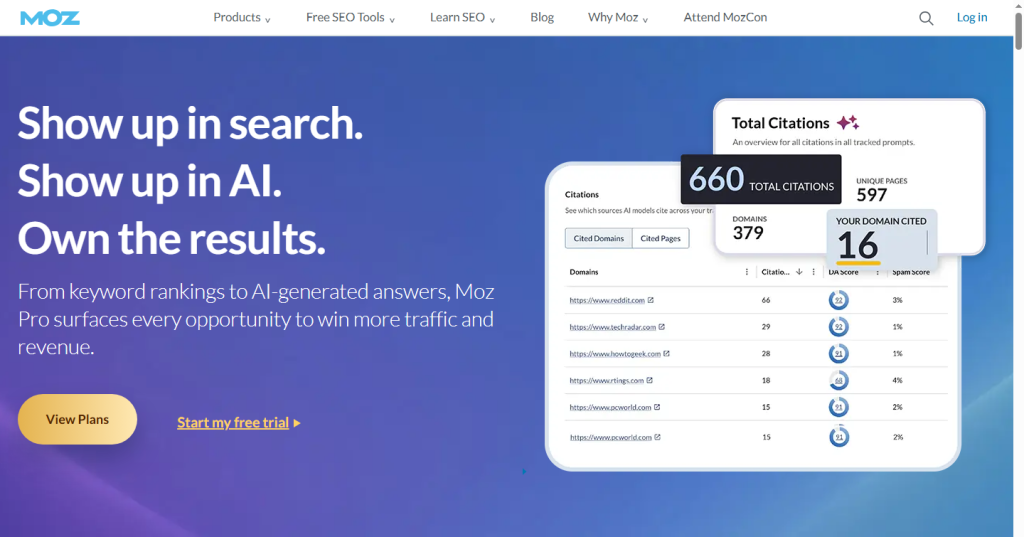
However, compared to other SEO tools such as Ahrefs, Semrush, and Ubersuggest, MOZ has chosen its unique approach to measurement and is constantly changing in response to SEO standards.
What Is Moz Domain Authority?
Domain Authority (DA) is a Moz-developed score that predicts how likely a website is to rank in search results. It ranges from 1 to 100, with higher scores generally indicating a stronger backlink profile and greater ranking potential.
DA is a comparative SEO metric, not a Google ranking factor. It helps marketers evaluate website authority against competitors based on backlink strength and overall SEO performance.
How Does Moz DA Work?
Moz DA uses a logarithmic scale, meaning higher scores become harder to improve.
- Moving from DA 10 to DA 20 is easier for a new website.
- Moving from DA 80 to DA 90 requires significantly more authority.
What Is a Good Moz DA Score?
A good DA score depends on your niche and competitors. No fixed score guarantees higher rankings.
| DA Score | Meaning |
|---|---|
| 1–20 | New or low-authority sites |
| 21–40 | Growing websites building authority |
| 41–60 | Competitive, established sites |
| 61+ | Strong authority domains |
What Is Moz Rank?
Moz Rank (MR) is an older link popularity metric that measures the strength of links pointing to a page or domain. It uses a 0–10 scale, with higher scores indicating stronger link authority.
Unlike Domain Authority (DA), which evaluates overall domain strength, Moz Rank focuses mainly on link quality and quantity. It is considered a predecessor to DA, which is now the more widely used Moz authority metric.
What Is Moz Spam Score?
Moz Spam Score estimates how closely a website’s backlink profile matches patterns commonly found on sites penalized or banned by Google.
The score ranges from 0% to 100% and is a risk indicator, not a Google ranking metric. Google does not use Moz Spam Score or publish its own version of this score.
| Spam Score | Meaning |
|---|---|
| 1–30% | Low risk |
| 31–60% | Review backlinks |
| 61–100% | High risk, requires audit |
A higher Spam Score does not automatically mean a penalty, but it can indicate the need to review suspicious or low-quality backlinks.
What Is Moz Visibility?
Moz Visibility is a rank tracking metric that estimates how much search visibility a website receives based on keyword rankings and search volume.
It is mainly used to track SEO progress over time. A rising Visibility score generally indicates improved organic presence, while a decline may signal ranking losses.
Why are Moz rank and Ahrefs ranking different?
Moz, Ahrefs, and Semrush use different data sets and methods to calculate authority scores, so their metrics are not directly interchangeable.
For example, a website may have a Moz DA of 40, an Ahrefs DR of 38, and a different Semrush Authority Score. These numbers can vary because each platform evaluates authority differently.
Moz DA considers multiple signals, including backlinks and spam factors, while Ahrefs DR focuses more heavily on backlink strength. These differences explain why SEO tools often show different scores for the same website.
What Are the Features of MOZ for SEO?
Moz offers SEO tools for keyword research, rank tracking, backlink analysis, site audits, and local SEO, helping marketers improve search visibility and make data-driven optimization decisions.
While some advanced capabilities are available through Moz Pro, the platform’s core features are built around simplifying SEO analysis and decision-making.
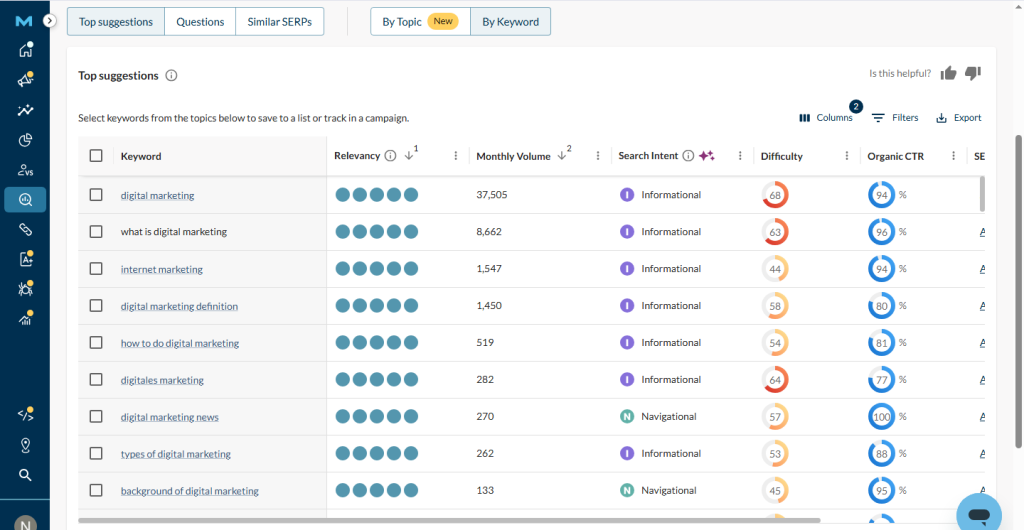
Is Moz Keyword Explorer Good Enough for Keyword Research?
Moz Keyword Explorer is one of Moz’s strongest tools for keyword research, helping users evaluate search opportunities beyond basic search volume.
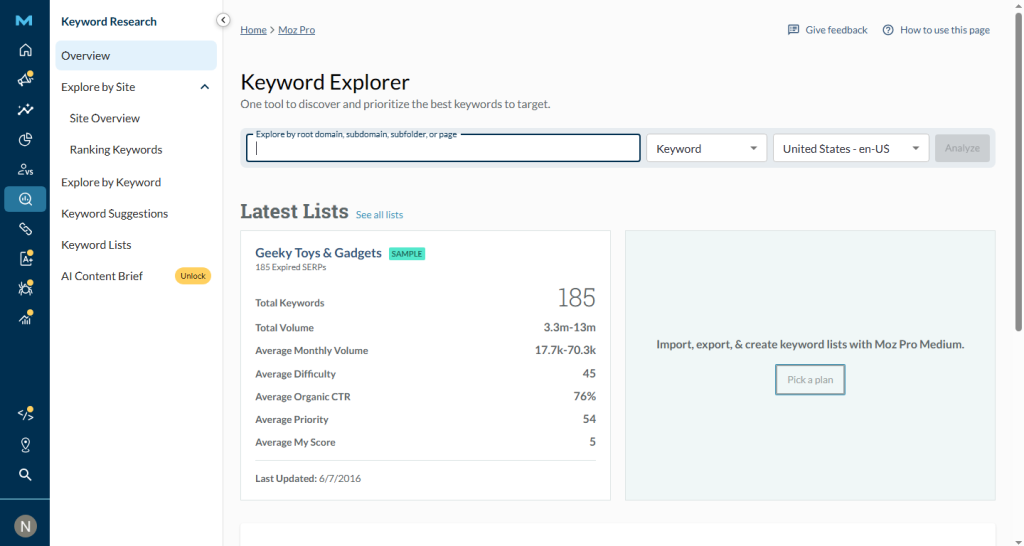
The tool provides key metrics such as:
- Keyword Difficulty: Estimates how competitive a keyword is.
- Search Volume: Shows the expected demand for a keyword.
- Organic CTR: Estimates how many users are likely to click organic results, considering SERP features like ads and featured snippets.
- Priority Score: Combines search volume, difficulty, and CTR potential into a single score to help identify better opportunities.
The Priority Score is one of Moz’s most useful features because it simplifies keyword selection by showing which terms offer the best balance between ranking difficulty and potential traffic.
How Accurate Is Moz Keyword Data?
Moz’s keyword data is reliable for general SEO research, especially for established topics and industries. However, its keyword database is smaller than some competitors, meaning highly specific or long-tail searches may have less coverage.
For important campaigns, marketers often combine Moz data with sources like Google Search Console to validate keyword opportunities.
How to Use Moz Keyword Explorer
- Open Keyword Explorer in Moz. Enter a keyword like digital marketing.
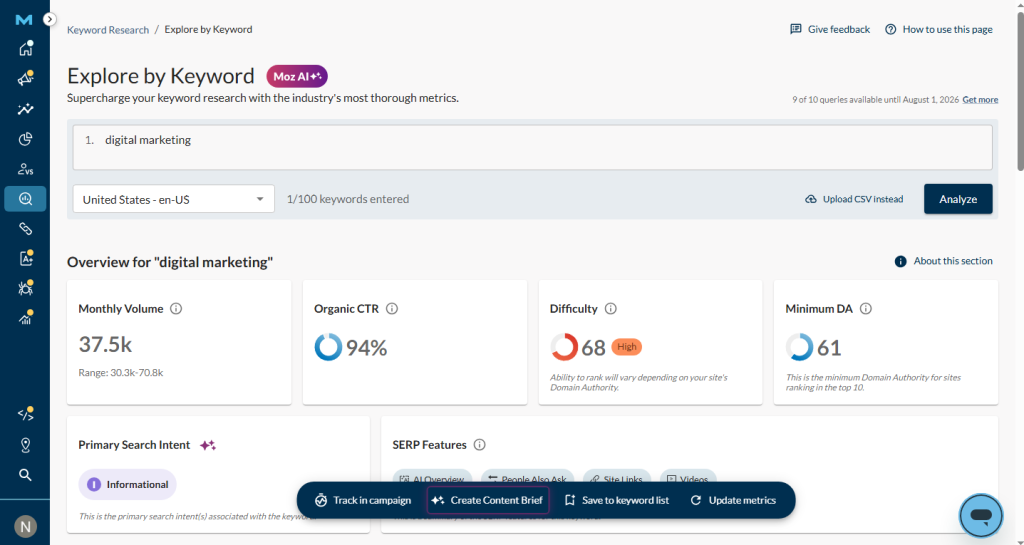
- Review Priority Score, search volume, difficulty, and CTR opportunity. Explore keyword suggestions and related terms.
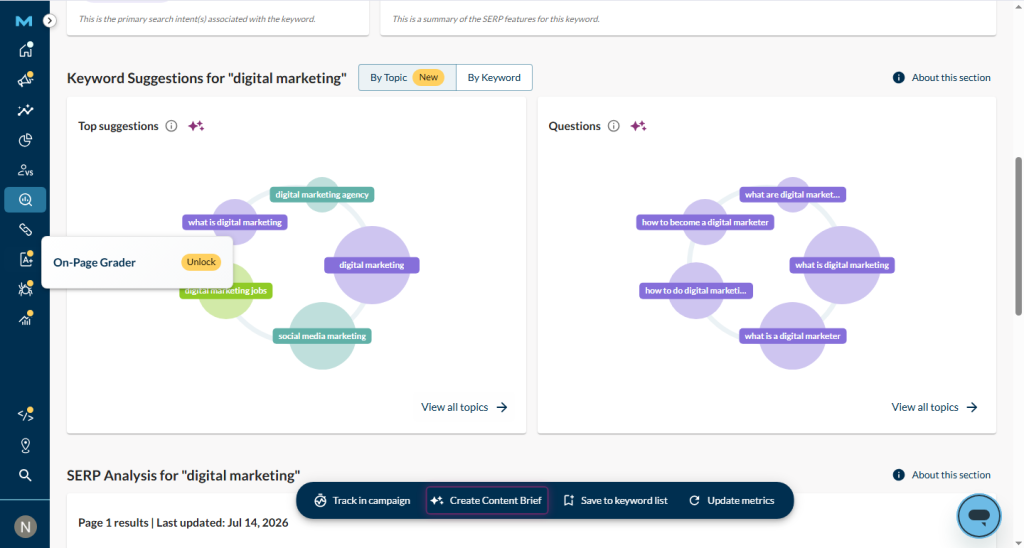
Filter keywords based on difficulty and ranking potential and save selected keywords into lists for tracking and analysis.
How Good Is Moz Link Explorer for Backlink Analysis?
Moz Link Explorer is a backlink analysis tool that helps users evaluate link profiles, find link-building opportunities, analyze competitors, and monitor backlink quality.
It is especially useful for checking Domain Authority (DA), Page Authority (PA), and identifying potentially harmful links.
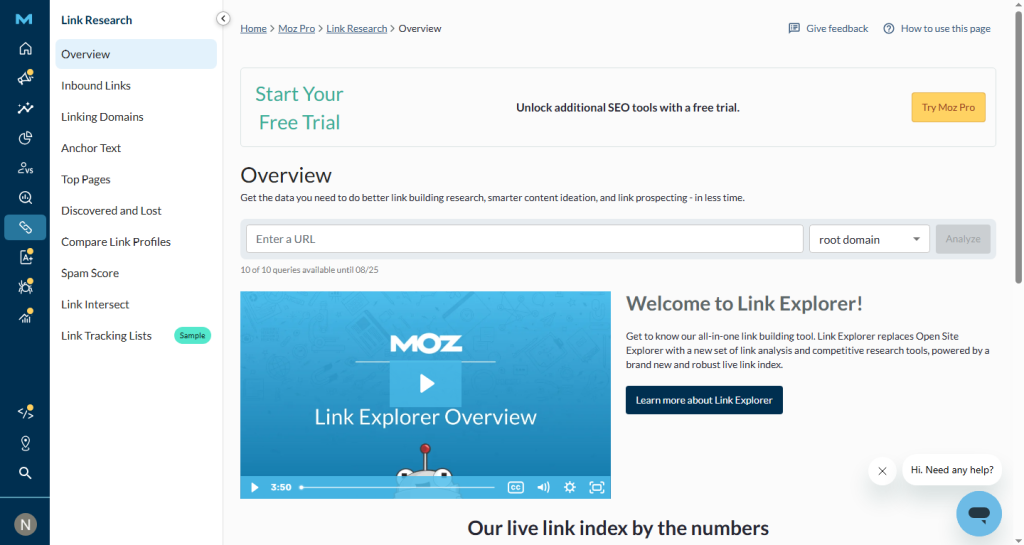
With Moz Link Explorer, you can:
- Analyze backlink profiles: View linking domains, anchor text, and link types.
- Evaluate link quality: Check DA, PA, and Spam Score of referring domains.
- Research competitors: Find backlink opportunities from competing websites.
- Identify risky links: Detect spammy sources that may require review.
Moz’s backlink index is smaller than Ahrefs and Semrush, making those platforms stronger for large-scale link research. However, Link Explorer remains a reliable option for marketers who need accurate backlink insights with a simpler workflow.
How Does Moz Rank Checker Work?
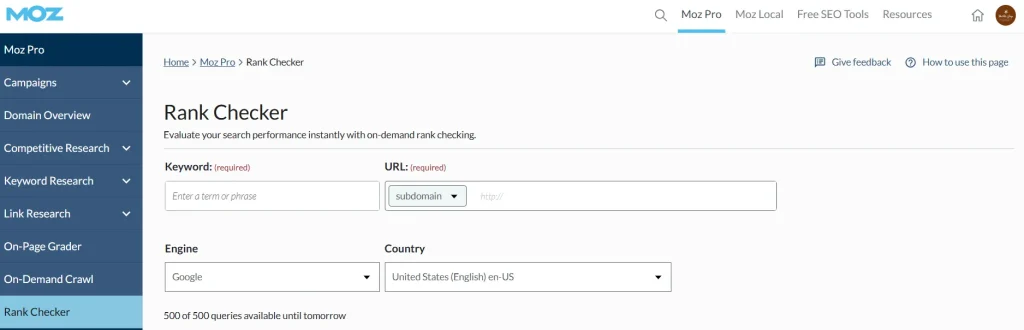
Moz Rank Checker helps users monitor keyword positions, track search performance, and identify ranking changes over time. It organizes tracking through Campaigns, where users add a website and target keywords to monitor their search visibility.
With Moz Rank Checker, you can:
- Track keyword rankings: Monitor how keywords perform in search results.
- Review ranking history: Compare current positions with past performance to identify improvements or declines.
- Monitor SERP features: Understand how search features impact keyword visibility.
Moz stores historical ranking data, allowing users to review performance trends within their campaigns. However, its default rank updates are generally slower than tools like Semrush, which offer more frequent tracking.
For users who need daily updates, higher Moz plans provide more frequent keyword refreshes, making them better suited for active SEO campaigns.
Does Moz Domain Overview Find Technical SEO Issues?
Moz Domain Overview does not replace a full technical SEO audit, but it helps identify important website issues and SEO opportunities, including visibility trends, keyword performance, backlink data, and overall site health.
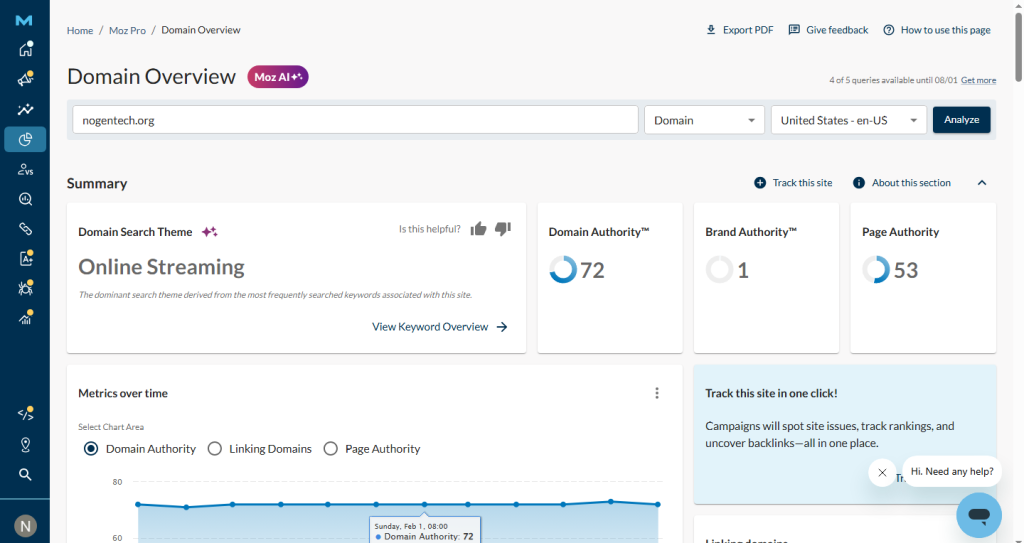
Key insights include:
- SEO performance: Track visibility trends and ranking changes.
- Keyword insights: Find ranking opportunities and monitor search performance.
- Backlink analysis: Review link profiles and authority signals.
- Site health signals: Identify areas that may need further optimization.
Moz also helps investigate possible penalty-related issues by highlighting signals linked to sudden ranking or traffic changes.
Compared with Semrush, Moz DAPA checker provides a simpler overview, while Semrush offers deeper technical crawling and audit features.
For small and mid-sized websites, Moz provides enough SEO insights for regular monitoring, but larger sites may need more advanced audit tools.
MOZ Site Audits
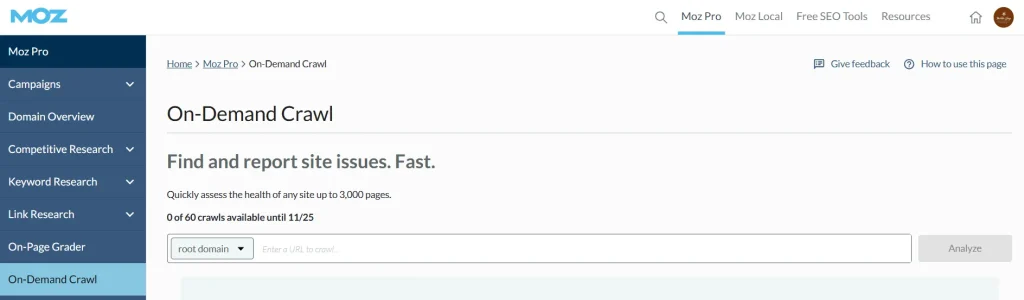
Regular site audits are becoming increasingly crucial to sustaining your position in this highly saturated and competitive world, as they will provide metrics regarding the performance of your technical SEO. As a result, you can find the critical flaws in your marketing strategies and learn about issues like broken backlinks, duplicate content, and crawling problems. Then, by following a comprehensive strategy, you can eliminate them all.
What Is Moz Local?
Moz Local is a local SEO tool that helps businesses manage online listings, keep business information consistent across directories, monitor reviews, and improve local search visibility from one dashboard.
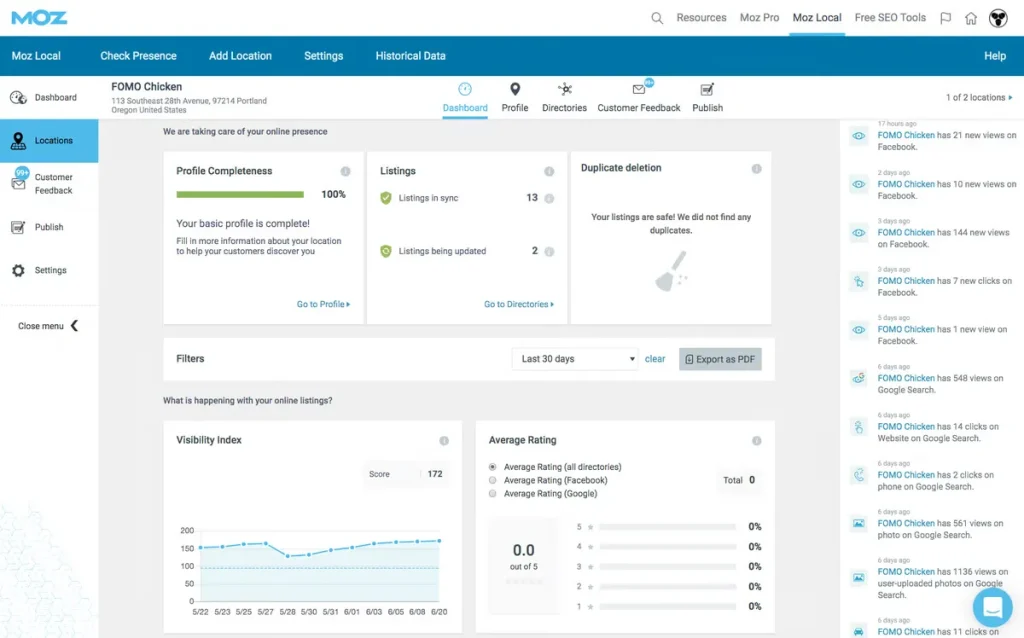
With Moz Local, businesses can:
- Manage listings: Keep Name, Address, and Phone (NAP) information accurate across search engines, directories, and platforms.
- Monitor reviews: Track customer reviews and manage responses.
- Improve local visibility: Monitor listing health and local search performance.
- Automate updates: Sync business information across supported directories and data sources.
How Much is Moz Local?
Moz Local pricing ranges from $20 to $40 per month per location on monthly billing, or $16 to $33 per month when billed annually.
| Plan | Price | Key Features |
|---|---|---|
| Lite | $20/mo | Listing distribution, review monitoring |
| Preferred | $30/mo | Review responses, social posting |
| Elite | $40/mo | AI listing management, advanced reporting |
| Enterprise | Custom | Multi-location support |
Moz Local distributes listings across 90+ directories and offers features such as AI-assisted listing management and social posting on higher plans. Additional tools like Listings AI and Reviews AI may increase the overall cost.
Should You Connect Moz Local to Google?
Yes. Connecting Moz Local with your Google Business Profile allows it to sync and manage business information across Google and other platforms.
This helps businesses:
- Keep NAP details consistent.
- Monitor listing health.
- Track Google Business Profile performance.
- Reduce errors caused by outdated business information.
Consistent local business data is important for maintaining accurate search visibility and improving local SEO performance.
What Is the Moz Extension?
The MozBar Chrome extension is a free SEO browser extension from Moz that helps users quickly analyze search results and webpages by showing metrics such as Domain Authority (DA), Page Authority (PA), and Spam Score.
With MozBar, users can:
- Check authority metrics: View DA, PA, and Spam Score directly on search results and webpages.
- Analyze SERPs: Compare competitor pages and evaluate ranking potential.
- Review links: Check link metrics while browsing any webpage.
- Perform quick SEO research: Get useful insights without opening the full Moz platform.
Free vs Premium MozBar Features
| Feature | Free MozBar | Premium MozBar |
|---|---|---|
| DA and PA metrics | Yes | Yes |
| Spam Score | Yes | Yes |
| Link metrics | Yes | Yes |
| Keyword difficulty | NO | Yes |
| Page optimization insights | NO | Yes |
| Location-based searches | NO | Yes |
When you see moz-extension:// in your browser address bar, it simply means the MozBar extension is active and communicating with Moz services to display SEO data. It is a normal browser extension process, not a security issue.
How Much is Moz Pro?
Moz Pro starts at $49/month on monthly billing or $39/month with annual billing. The main difference between plans is the number of projects, tracked keywords, crawl limits, and user access.
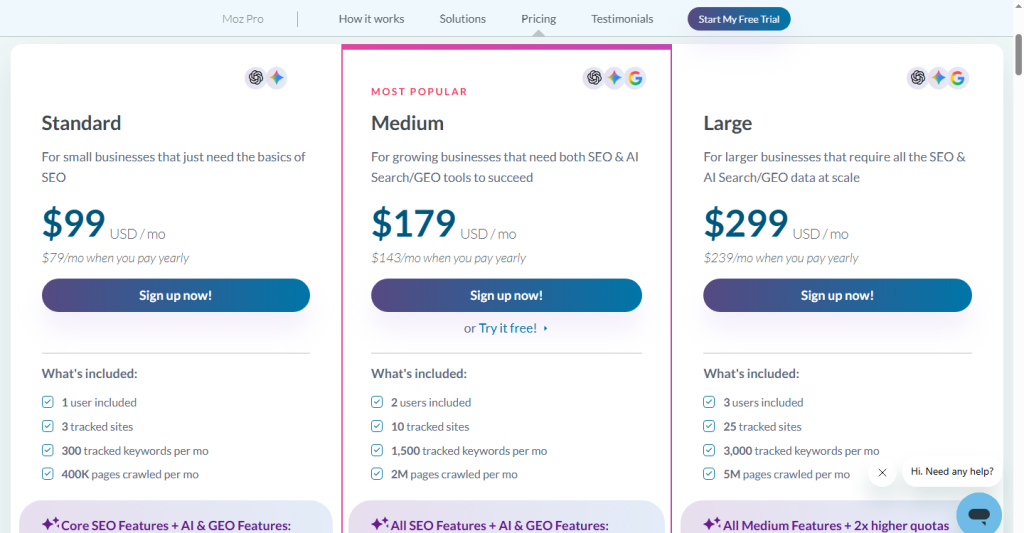
All Moz Pro plans include the core SEO features. Higher tiers mainly increase usage limits, tracked websites, and crawl capacity.
Moz also offers free tools, including Domain Analysis, MozBar, and limited keyword research features. These are useful for quick checks but do not replace the full Moz Pro platform.
| Plan | Monthly | Annual | Projects | Keyword Rankings |
|---|---|---|---|---|
| Starter | $49/mo | $39/mo | 1 | 50 |
| Standard | $99/mo | $79/mo | 3 | 300 |
| Medium | $179/mo | $143/mo | 10 | 1,500 |
| Large | $299/mo | $239/mo | 25 | 3,000 |
Does Moz Pro Offer a Free Trial?
Yes. Moz Pro offers a 7-day free trial with access to Medium plan features. Users must cancel before the trial ends to avoid automatic billing.
Annual vs Monthly Billing
Annual billing saves 20% and is better for users who plan to use Moz long-term.
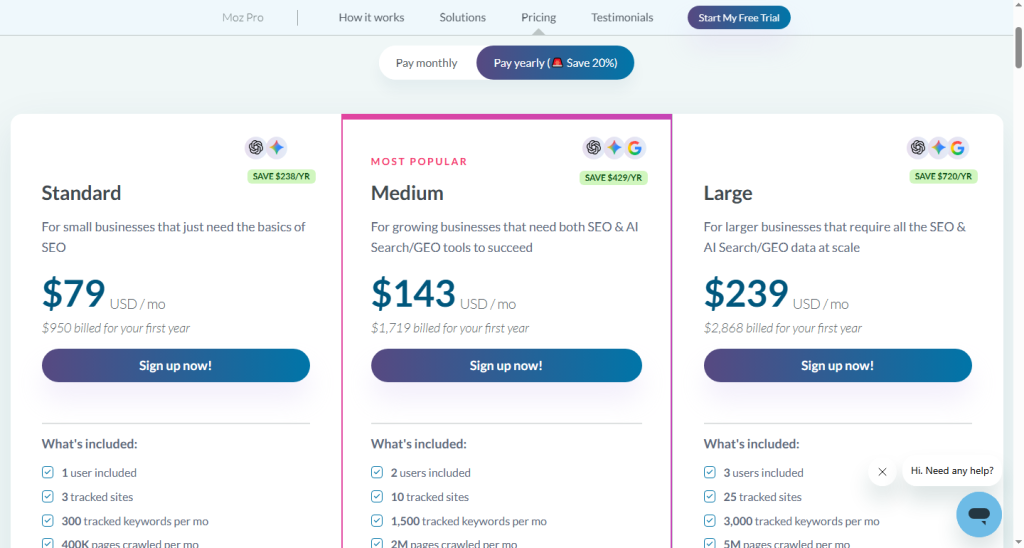
Monthly billing costs more but provides flexibility for those still evaluating the platform.
What are the Moz Alternatives?
The best Moz alternative depends on your SEO goals. Some tools offer deeper data, while others focus on affordability or simplicity.
1. Semrush — Best All-in-One Alternative
Semrush is a strong alternative for users who need a broader marketing platform with SEO, PPC, content marketing, and competitive research tools. It costs more than Moz but offers a wider feature set for agencies and larger teams.
2. Ahrefs — Best for Backlink Analysis
Ahrefs is the better choice for users who need deeper backlink research and competitor analysis. Its larger link database makes it a stronger option than Moz for advanced link-building workflows.
3. SE Ranking — Best Budget Alternative
SE Ranking offers a complete SEO toolkit with rank tracking, keyword research, analytics, and site audits at a price close to Moz. It is a good option for small teams that want daily rank updates and essential SEO features.
4. Mangools — Best for Beginners
Mangools combines keyword research, SERP analysis, rank tracking, backlink research, and site profiling in a simple interface. It is suitable for beginners who want an easier and lower-cost SEO solution.
5. Ubersuggest — Best Free Option
Ubersuggest provides free keyword research and basic SEO auditing features. It is a useful starting point for users who are not ready to invest in a paid SEO platform.
6. Majestic — Best for Link Analysis
Majestic focuses mainly on backlink analysis and offers metrics like Trust Flow and Citation Flow. It is a good alternative for users who only need link intelligence rather than a complete SEO platform.
People Also Want to Know About Moz
Is Moz better than Ahrefs?
Moz is better for beginners, small businesses, and users who want an affordable and easy-to-use SEO platform. Ahrefs is better for advanced SEO professionals who need deeper backlink analysis and competitor research.
Is Moz free to use?
Yes. Moz offers free tools like MozBar, Domain Analysis, and limited keyword research. Full access requires a paid plan.
Can I view historical rankings in Moz?
Yes. Moz stores ranking history within campaigns, allowing users to track keyword performance over time.
How does Moz calculate SEO metrics?
Moz uses factors like backlinks, linking domains, and other SEO signals to calculate metrics such as Domain Authority.
What Is a Good Moz Value?
A good Moz value (Domain Authority) is generally 50 to 60, while 60+ is considered excellent. For Spam Score, a lower value is better; 0% to 30% is generally considered low risk. Compare both metrics with competing websites rather than relying on a number alone.
Should I connect Moz Local to Google Business Profile?
Yes. Connecting Moz Local helps keep business information accurate and consistent across Google and other platforms.
Is Moz Local worth it?
Yes. Moz Local is useful for businesses that need to manage local listings, keep business information consistent, monitor reviews, and improve local search visibility.
Can I go back two months with Moz SEO reports?
Yes. Moz stores historical ranking data within campaigns, allowing users to compare keyword performance over time. Available history depends on when tracking started and the plan used.
What does Moz mean?
Moz originally started as SEOmoz, an SEO community founded in 2004. The company later became Moz, a platform that provides SEO tools for keyword research, rankings, backlinks, and website optimization.
Why Choose Moz And Who Should Use It?
Moz is a good choice for users who want a simple, reliable, and affordable SEO platform without the complexity of larger tools.
My suggestion is that its easy-to-use interface, Domain Authority metric, and beginner-friendly workflow make it suitable for bloggers, small businesses, local businesses, and marketers managing SEO without a dedicated team.
Moz is best for:
- SEO beginners: A simple interface makes it easier to learn SEO fundamentals.
- Small businesses: Manage website optimization without hiring a full SEO team.
- Local businesses: Use Moz Local for listings and review management.
- Budget-conscious agencies: Access trusted SEO metrics and essential tools at a lower cost.
- Developers: Use affordable API access for SEO data.
Consider alternatives if you need:
- Advanced backlink research: Ahrefs offers deeper link data.
- PPC and broader marketing tools: Semrush provides a more complete marketing suite.
- More frequent rank tracking: SE Ranking offers stronger daily tracking options.
- Enterprise SEO management: Larger websites may need tools built for bigger campaigns.