From Floor Plan to Faster Service – Why Table View Matters in Restaurant POS Systems

Think about the last time you dined out—your server probably had to juggle multiple tables, remember who ordered what, and keep track of which guests were waiting for refills or ready to pay. In a busy restaurant, that kind of multitasking can make or break the guest experience.
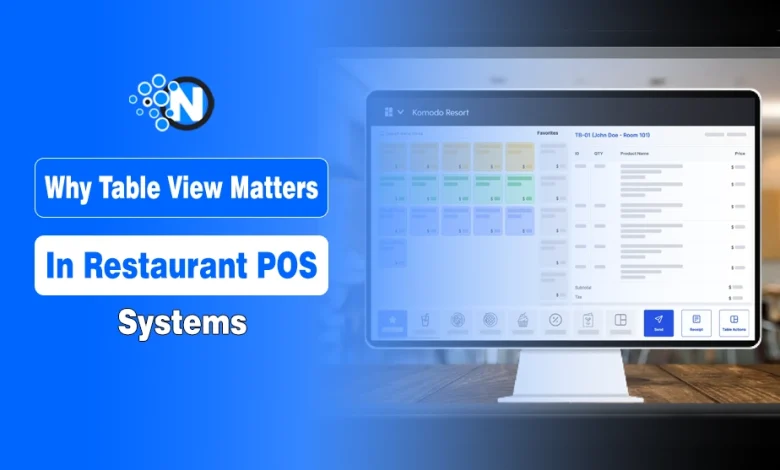
Now imagine if the staff had a digital floor plan right in front of them, showing every table’s status in real time. Suddenly, service feels smoother, orders are more accurate, and guests don’t have to wait as long.
That’s the power of table view in modern POS systems: it connects the physical layout of your restaurant directly to the digital tools your team uses every day. And when you look closer, you’ll see why the Table View restaurant POS system is becoming a must-have for faster, smarter service.
Why Restaurants Struggle During Peak Hours (and It’s Not Just Staffing)
Owners often blame peak-hour problems on staffing shortages, slow cooks, or “a bad crowd.” Those can be factors, sure. But in many restaurants, the real bottleneck is coordination: who is seated, who is ordering, who is waiting, who is paid, and who needs attention right now.
When that coordination lives in people’s heads or on scraps of paper, it breaks the moment the hall fills up. A good system makes the state of the floor’s condition obvious to everyone instantly.
That’s where modern restaurant POS systems have evolved beyond “take an order, print a ticket.” They’re now the hub of the dining hall: a shared operational truth. The table view is the part of the system that turns that truth into action.
What “Table View” Actually Changes on the Floor
A table view is essentially a live dashboard of your dining hall. But the impact isn’t just visual, it changes behaviors:
- Hosts sit more evenly because they see sections, server load, and table availability.
- Servers prioritize better because they see which tables are waiting to order, which are waiting for food, and which are ready to pay.
- Managers spot issues early because anomalies stand out (a table stuck on “ordered” for too long, or checks open past a reasonable time).
- Kitchen pacing improves because orders flow more predictably, not in sudden bursts caused by chaotic floor timing.
This reduces the most expensive kind of delay: the delay your guests feel.
The Guest Experience Is Built on Invisible Timing
Guests rarely complain about “poor workflow.” They complain about the symptoms:
- “We waited too long to be greeted.”
- “Our drinks took forever.”
- “Nobody brought the check.”
- “We couldn’t get someone’s attention.”
In a crowded restaurant, those issues are usually not caused by uncaring staff. Missed signals cause them.
A strong table view automatically signals status changes, provides time-on-table indicators, uses color cues, and prompts the team to do the next right thing. It’s a quiet assistant that keeps service consistent.
And consistency, in restaurants, is a brand.
How Does This Fit Into POS Systems for Restaurants Today
Many owners still think of POS as a register with a receipt printer. In reality, POS systems for restaurants are full operational platforms. Even if you don’t use every feature, the POS touches:
- Seating and sections
- Orders and modifiers
- Kitchen routing
- Payments and tips
- Discounts and comps
- Reporting and labor insights
The table view is where these pieces come together in real time. It’s not “management reporting.” It’s “service execution.”
When you choose or optimize a system, the question isn’t “Does it have table view?” It’s: Does the table view reflect how your restaurant actually runs?
What a “Good” Table View Looks Like?
Not all table views are created equal. From an operational standpoint, a strong table view design has a few traits:
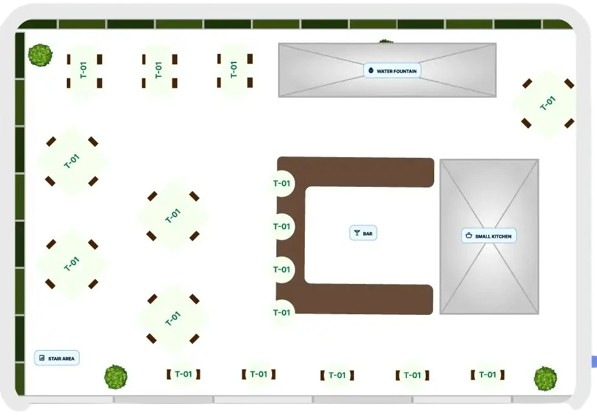
1) It shows your real floor plan
If the system doesn’t match your physical layout, staff won’t trust it. The view should represent tables, bar seats, patio, and private areas as they exist, so staff can act without translating.
2) Status is obvious at a glance
At minimum, you want clear states like:
- Available
- Seated
- Ordered
- Food delivered (or coursed)
- Check requested
- Paid / needs reset
The more intuitive the status, the less training you need and the fewer mistakes that happen under pressure.
3) It supports sections and server assignment
Restaurants succeed or fail on a balanced workload. A table view should help avoid the classic disaster: one server weeds out while another sits idle.
4) It makes transfers painless
Guests move, parties combine, and seats change, especially in real life. A system that makes table transfers complicated creates delays and “lost” checks.
5) It helps prevent revenue leakage
Open checks forgotten, misapplied discounts, missed items, these aren’t moral failures; they’re workflow failures. A clear table view reduces the risk that items will never be rung in or that payments will never be closed.
Where Hospitality Management Software Comes in
A POS doesn’t operate in isolation anymore. Many restaurants now think in terms of hospitality management software, a set of connected systems that help run the entire operation, not just the register.
In a modern setup, the table view interacts with:
- Reservations and waitlist logic (reducing walk-away guests)
- Kitchen display pacing
- Staff performance metrics (turn time, table touches)
- Guest profiles and loyalty (when applicable)
- Inventory and menu engineering insights
This broader ecosystem is what people mean by hospitality management software: the tools that bring front-of-house, back-of-house, and management into a single operational rhythm.
The point isn’t to “add software.” It’s to reduce friction among the existing tasks.
Practical Ways to Improve Your Table View Workflow This Month
You don’t always need a new system to get better outcomes. Often, it’s about setting standards around the tools you already have:
- Standardize status changes
Decide when a table should be marked “ordered,” “served,” and “paid,” and train everyone consistently. - Define section logic
Even if you rotate sections, ensure the POS reflects the current assignment so the host doesn’t guess. - Use the view for pre-shift communication.
Before service, identify large parties, reserved areas, blocked tables, and staffing constraints. - Audit your “stuck tables.”
Look for checks that stay open too long or tables that sit in the same state for extended periods. The problem is usually a workflow gap you can fix. - Simplify modifiers and coursing.
If staff avoid the POS because it’s cumbersome, the table view won’t help. Clean up menus, streamline modifiers, and align the POS with how your kitchen actually cooks.
Table View Is No Longer Optional
Restaurants thrive on personality and human connection, but they also need speed and accuracy to stay competitive. Table view in restaurant POS helps strike that balance. Whether you’re running a small bistro or a bustling fine-dining space, this feature is becoming less of a luxury and more of a necessity for modern restaurants.
It automates the repetitive parts of service while freeing staff to focus on genuine hospitality moments. The result? Faster service, happier guests, and a team that feels supported instead of overwhelmed.